
STM32 Black Pill: SSD1306 OLED (I2C)
STM32 Black Pill: SSD1306 OLED (I2C) is a runnable microcontroller simulation example on SensBench — open the wired circuit, inspect the code, and compile real firmware in your browser, no install needed. Last updated Aug 14, 2026.
FREE SIMULATOR EXAMPLE · INTERMEDIATE
STM32 Black Pill: SSD1306 OLED (I2C)
This example drives a 128×64 SSD1306 OLED from the STM32 Black Pill F411 over I2C1 (SCL=PB6, SDA=PB7), showing “Black Pill F4” with a live counter. It is the F411’s display bring-up test — same wiring and libraries as the Blue Pill, faster core.
| Board | STM32 Black Pill (STM32F411, Cortex-M4, 100 MHz) |
|---|---|
| Difficulty | intermediate |
| Category | displays |
| Libraries | Adafruit SSD1306, Adafruit GFX Library |
| Runs in | Sensbench browser simulator — free, no account |
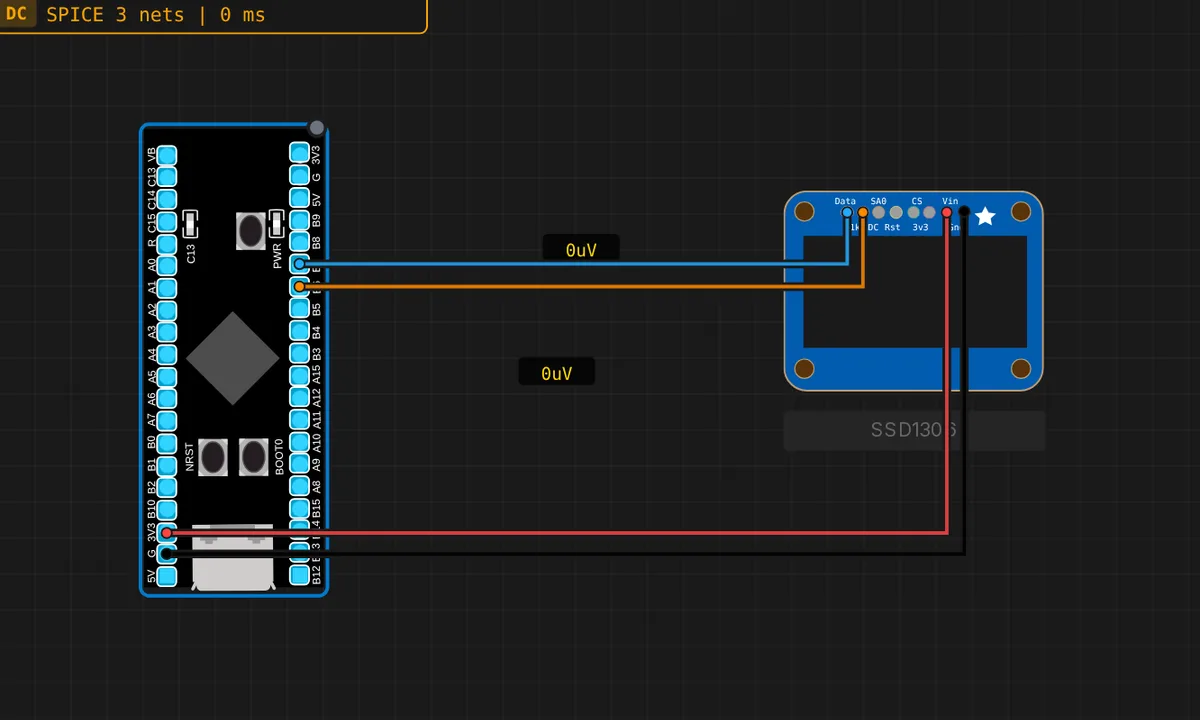
The exact circuit you get when you open this example — already wired, ready to run.
The sketch
// STM32 Black Pill (F411) — SSD1306 128x64 OLED over I2C1
// Wiring: SDA -> PB7  |  SCL -> PB6  |  VCC -> 3V3  |  GND -> GND
// Requires: Adafruit SSD1306, Adafruit GFX Library
#include <Wire.h>
#include <Adafruit_GFX.h>
#include <Adafruit_SSD1306.h>

Adafruit_SSD1306 display(128, 64, &Wire, -1);
int counter = 0;

void setup() {
  Serial.begin(115200);
  Wire.begin();
  if (!display.begin(SSD1306_SWITCHCAPVCC, 0x3C)) {
    Serial.println("SSD1306 not found!");
    while (true) delay(10);
  }
  Serial.println("OLED ready");
}

void loop() {
  counter++;
  display.clearDisplay();
  display.setTextColor(SSD1306_WHITE);
  display.setTextSize(2);
  display.setCursor(0, 0);
  display.println("Black");
  display.println("Pill F4");
  display.setTextSize(1);
  display.setCursor(0, 52);
  display.print("count: "); display.print(counter);
  display.display();
  Serial.print("Frame: "); Serial.println(counter);
  delay(1000);
}
How it works
The sketch initializes I2C1 with Wire.begin() (SCL=PB6, SDA=PB7 on the Black Pill), then display.begin(SSD1306_SWITCHCAPVCC, 0x3C) probes the 128×64 panel at the standard address. The fail-fast loop prints “SSD1306 not found!” and parks if the display does not answer.
Every second the loop clears the framebuffer, draws “Black Pill F4” in 2x text and an incrementing counter in 1x text, then display.display() blits the whole frame atomically — no flicker, because the SSD1306 holds the frame internally. The Serial Monitor mirrors the frame counter, so the sketch is verifiable with the display unplugged.
Before you build it for real
The SSD1306 module’s address — 0x3C or 0x3D depending on the back resistor — is hard-coded at 0x3C; wrong address, and the sketch hangs in the “not found” loop. The display is a 3.3 V part: VCC to 3V3, never 5 V, or the module’s regulator dies. And the F411 is not 5 V tolerant: if the OLED module carries level converters or you attach a 5 V I2C bus, the SDA/SCL lines need shifting before they reach PB6/PB7.
Get the parts
Related examples
FAQ
Why does the F411 need the same libraries as the Blue Pill?
The Adafruit SSD1306 and GFX libraries are written against the Arduino Wire API, which the STM32 core maps to the chip’s hardware I2C. The F411’s I2C1 peripheral is at the same PB6/PB7 pins, so the library stack and wiring are identical — only the core underneath is faster.
Why does the sketch hang if the display is missing?
The while (true) delay(10) after a failed display.begin() is a deliberate fail-fast: a display project without a display is useless, so the sketch parks itself instead of running blind. On a real board this behavior makes wiring errors obvious in seconds.