
STM32: BMP280 Weather Sensor (I2C)
STM32: BMP280 Weather Sensor (I2C) is a runnable microcontroller simulation example on SensBench — open the wired circuit, inspect the code, and compile real firmware in your browser, no install needed. Last updated Aug 14, 2026.
FREE SIMULATOR EXAMPLE · INTERMEDIATE
STM32: BMP280 Weather Sensor (I2C)
This example reads temperature and pressure from a BMP280 sensor over the STM32 Blue Pill’s hardware I2C1 bus (SCL=PB6, SDA=PB7), printing both values to the Serial Monitor every two seconds. It uses the same Adafruit BMP280 library stack you would use on any Arduino-family board.
| Board | STM32 Blue Pill (STM32F103C8, Cortex-M3, 72 MHz) |
|---|---|
| Difficulty | intermediate |
| Category | sensors |
| Libraries | Adafruit BMP280 Library, Adafruit Unified Sensor |
| Runs in | Sensbench browser simulator — free, no account |
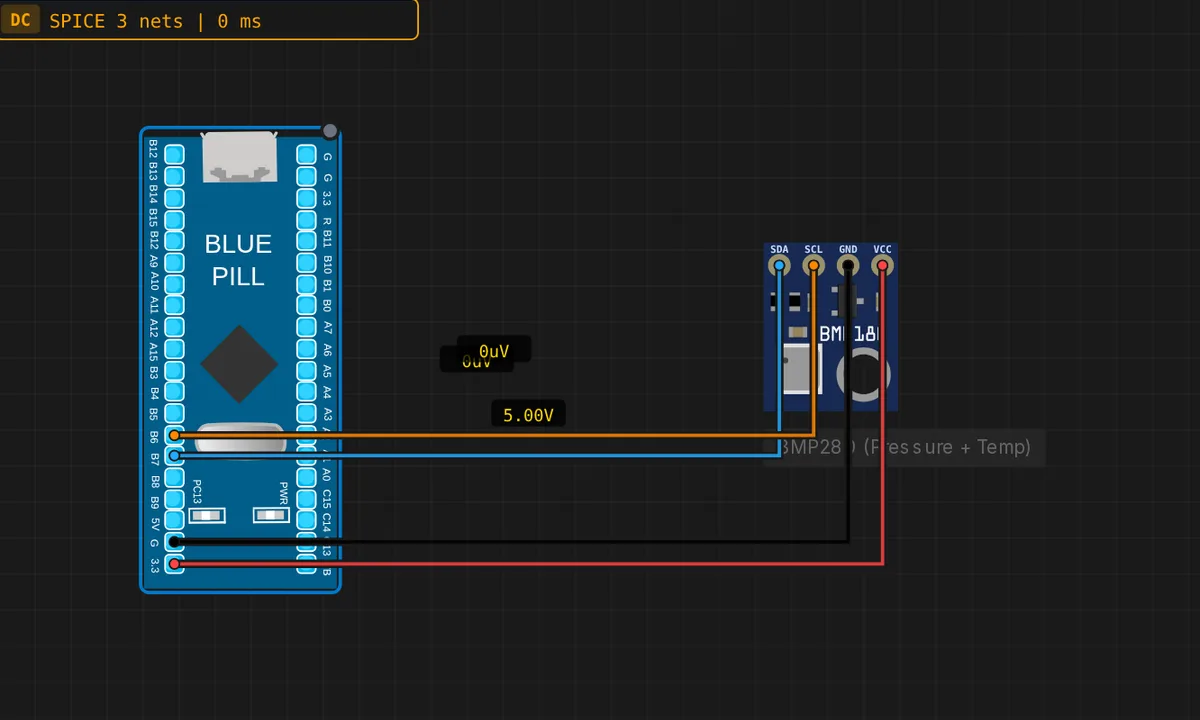
The exact circuit you get when you open this example — already wired, ready to run.
The sketch
// STM32 Blue Pill (F103) — BMP280 over I2C1
// Wiring: SDA -> PB7  |  SCL -> PB6  |  VCC -> 3V3  |  GND -> GND
// Requires: Adafruit BMP280 Library, Adafruit Unified Sensor

#include <Wire.h>
#include <Adafruit_BMP280.h>

Adafruit_BMP280 bmp;   // I2C

void setup() {
  Serial.begin(115200);
  Wire.begin();        // I2C1: SCL=PB6, SDA=PB7
  if (!bmp.begin(0x76)) {
    Serial.println("BMP280 not found! Check wiring.");
    while (true) delay(10);
  }
  bmp.setSampling(Adafruit_BMP280::MODE_NORMAL,
                  Adafruit_BMP280::SAMPLING_X2,
                  Adafruit_BMP280::SAMPLING_X16,
                  Adafruit_BMP280::FILTER_X16,
                  Adafruit_BMP280::STANDBY_MS_500);
  Serial.println("BMP280 ready");
}

void loop() {
  float tempC    = bmp.readTemperature();
  float pressure = bmp.readPressure() / 100.0F; // hPa
  Serial.print("Temp: ");
  Serial.print(tempC);
  Serial.print(" C  Pressure: ");
  Serial.print(pressure);
  Serial.println(" hPa");
  delay(2000);
}
How it works
The sketch initializes the STM32’s hardware I2C1 peripheral with Wire.begin() — on the Blue Pill that maps to SCL on PB6 and SDA on PB7. Then bmp.begin(0x76) probes the sensor at its default I2C address. If nothing answers, the sketch prints “BMP280 not found!” and spins forever — a deliberate fail-fast so wiring errors are obvious.
The loop reads temperature and pressure every two seconds: bmp.readTemperature() returns Celsius directly, and bmp.readPressure() / 100.0 converts the raw pascals to hectopascals, the unit weather reports use. The printed line — temperature in Celsius plus pressure in hPa — is the standard environmental monitoring format.
The setSampling() call is worth reading closely: it configures the sensor’s ADC oversampling (x2 temperature, x16 pressure), a x16 IIR filter for smoothing, and 500 ms standby. Higher oversampling buys noise rejection at the cost of slower response — x16 pressure is the classic weather-station trade-off.
Before you build it for real
The BMP280 has two I2C addresses — 0x76 and 0x77 — selected by the SDO pin. This sketch uses 0x76; if your module answers at 0x77, bmp.begin() silently fails and the sketch hangs in the “not found” loop. The F103’s I2C1 pins are PB6/PB7, but many Blue Pill clones also expose I2C on PB8/PB9 (I2C1 alt) and the pin mapping depends on the core’s Wire implementation — the Arduino_STM32 core maps Wire to PB6/PB7, which this sketch assumes. And the BMP280 is a 3.3 V part: on a real build, VCC goes to 3V3, not the 5 V rail the board’s USB connector provides.
Get the parts
Related examples
FAQ
Why does the BMP280 need two libraries?
The Adafruit BMP280 library implements the sensor itself, but it depends on the Adafruit Unified Sensor library for the common sensor interface. Both install from the Library Manager — the dependency chain is standard for Adafruit sensors and identical on Arduino, ESP32 and STM32.
What does the setSampling() call configure?
It tunes the sensor’s internal sampling: oversampling x2 for temperature, x16 for pressure, a x16 filter for smoothing, and 500 ms standby between measurements in normal mode. Higher oversampling means better noise rejection at the cost of slower updates and higher current — x16 pressure is the common “weather station” setting.