
STM32: Push Button -> LED
STM32: Push Button -> LED is a runnable microcontroller simulation example on SensBench — open the wired circuit, inspect the code, and compile real firmware in your browser, no install needed. Last updated Aug 14, 2026.
FREE SIMULATOR EXAMPLE · BEGINNER
STM32: Push Button -> LED
This example reads a pushbutton on PA0 of the STM32 Blue Pill and mirrors it to the onboard PC13 LED, printing each press and release to the Serial Monitor. It demonstrates GPIO input with internal pull-up and the active-LOW output style this board expects.
| Board | STM32 Blue Pill (STM32F103C8, Cortex-M3, 72 MHz) |
|---|---|
| Difficulty | beginner |
| Category | basics |
| Libraries | None — just the Arduino core |
| Runs in | Sensbench browser simulator — free, no account |
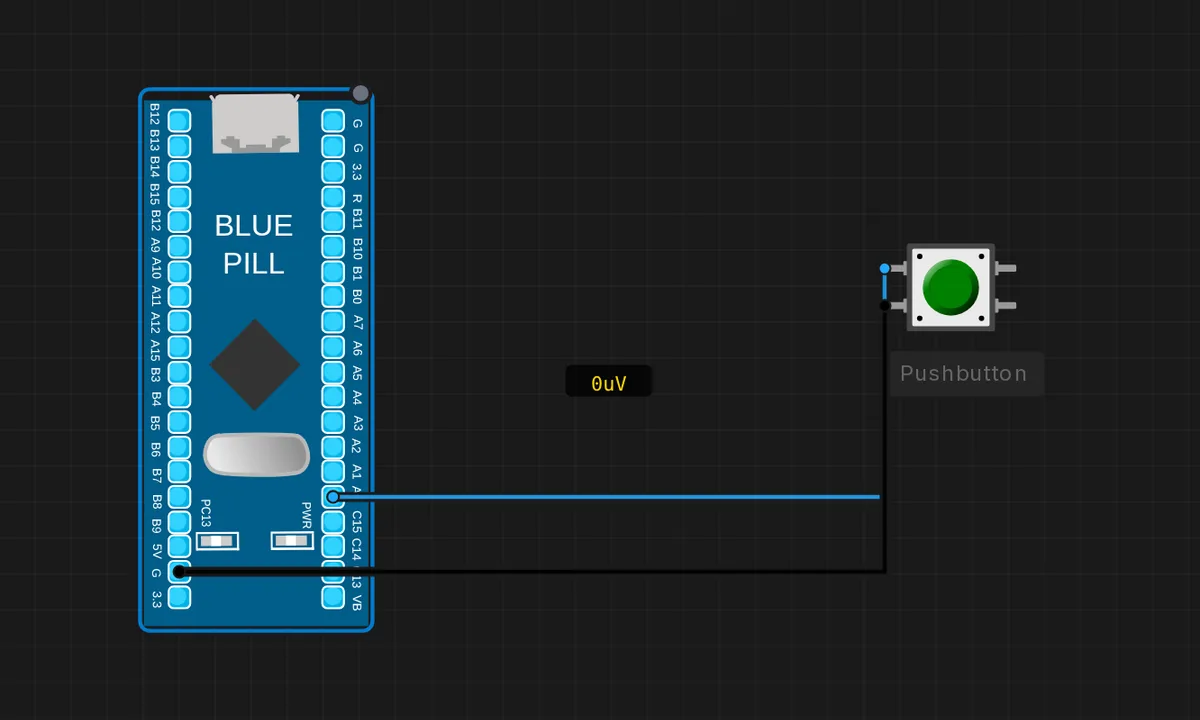
The exact circuit you get when you open this example — already wired, ready to run.
The sketch
// STM32 Blue Pill (F103) — push button on PA0 -> onboard PC13 LED
// Button between PA0 and GND. PC13 LED is active-LOW.
const int BTN = PA0;
const int LED = PC13;

void setup() {
  Serial.begin(115200);
  pinMode(BTN, INPUT_PULLUP);
  pinMode(LED, OUTPUT);
  digitalWrite(LED, HIGH);     // LED off (active-low)
  Serial.println("Press the button");
}

void loop() {
  bool pressed = (digitalRead(BTN) == LOW);
  digitalWrite(LED, pressed ? LOW : HIGH);   // pressed -> LED on
  static bool last = false;
  if (pressed != last) {
    Serial.println(pressed ? "PRESSED -> LED ON" : "released -> LED OFF");
    last = pressed;
  }
  delay(20);
}
How it works
The sketch uses INPUT_PULLUP on PA0 — the F103’s internal pull-up resistor holds the pin HIGH, so the button only needs to connect the pin to GND. The pressed state is digitalRead(BTN) == LOW, and the LED on PC13 is driven active-LOW: pressed ? LOW : HIGH.
A static bool last remembers the previous state and the sketch prints only on transitions — “PRESSED” when the button goes down, “released” when it comes up. The 20 ms loop delay gives a light debounce and keeps the serial output readable; the edge-triggered printing is the pattern to copy for any event-driven input.
Before you build it for real
The button is wired between PA0 and GND, relying on the internal pull-up. On real hardware the internal pull-up is about 40 kOhm and sensitive to noise — for long wires or industrial environments, add an external 10 kOhm pull-up to 3.3 V. There is no proper debounce in this sketch: mechanical buttons bounce for 5-20 ms, and while a 20 ms poll hides most of it, a real device that counts presses will over-count without a debounce routine. And remember PC13 is active-LOW — the LED logic here is deliberately inverted.
Get the parts
Related examples
FAQ
Why is the LED on when the button is pressed, not when released?
With INPUT_PULLUP, PA0 sits HIGH at rest; pressing the button grounds it, so a press reads LOW. The sketch maps that to the active-LOW LED: pressed ? LOW : HIGH. Both inversions cancel out, and the visible behavior is intuitive — press, LED on.
Can I use any pin for the button?
Yes, any GPIO works. PA0 is a sensible default because it doubles as an ADC channel and has a 5 V-tolerant input on the F103 — handy when you later experiment with analog sensing on the same pin.