
STM32: Slide Switch -> LED
STM32: Slide Switch -> LED is a runnable microcontroller simulation example on SensBench — open the wired circuit, inspect the code, and compile real firmware in your browser, no install needed. Last updated Aug 14, 2026.
FREE SIMULATOR EXAMPLE · BEGINNER
STM32: Slide Switch -> LED
This example reads a slide switch on PA0 of the STM32 Blue Pill and reflects its position on the onboard PC13 LED, printing each flip to the Serial Monitor. It is the latching-input counterpart to the pushbutton example — same pin, no pull-up needed.
| Board | STM32 Blue Pill (STM32F103C8, Cortex-M3, 72 MHz) |
|---|---|
| Difficulty | beginner |
| Category | basics |
| Libraries | None — just the Arduino core |
| Runs in | Sensbench browser simulator — free, no account |
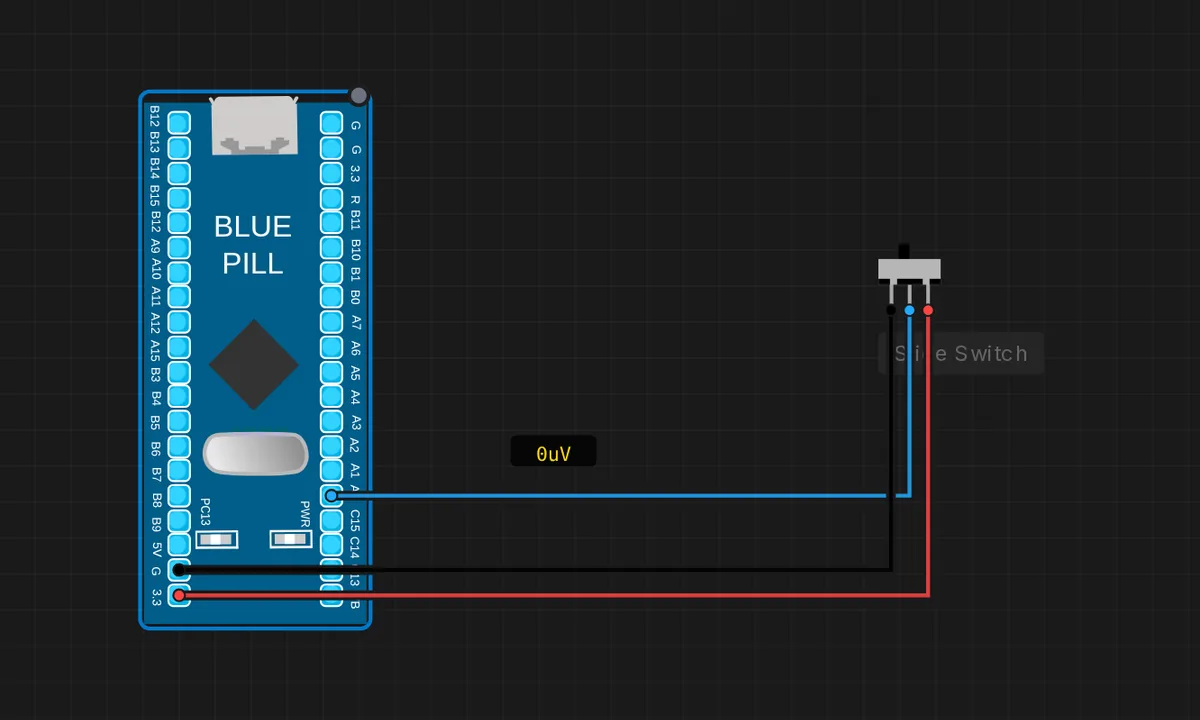
The exact circuit you get when you open this example — already wired, ready to run.
The sketch
// STM32 Blue Pill (F103) — slide switch on PA0 -> onboard PC13 LED
// Switch common (pin 2) -> PA0, ends to GND / 3V3. PC13 LED is active-LOW.
const int SW = PA0;
const int LED = PC13;

void setup() {
  Serial.begin(115200);
  pinMode(SW, INPUT);
  pinMode(LED, OUTPUT);
  Serial.println("Flip the switch");
}

void loop() {
  bool on = (digitalRead(SW) == HIGH);
  digitalWrite(LED, on ? LOW : HIGH);    // switch ON -> LED on
  static int last = -1;
  if ((int)on != last) {
    Serial.println(on ? "switch ON  -> LED ON" : "switch OFF -> LED OFF");
    last = on;
  }
  delay(50);
}
How it works
PA0 is configured as a plain INPUT — the slide switch connects it to 3.3 V in one position and GND in the other, so the pin always has a defined level. The sketch reads the state and drives the active-LOW PC13 LED: switch ON reads HIGH, and the LED lights with LOW.
Like the button example, a static int last edge detector prints only when the state changes, keeping the serial output to one line per flip. The 50 ms poll period is plenty for a human flipping a switch and leaves the CPU free.
Before you build it for real
A slide switch’s contacts are wipers on a metal track, and over years of use they wear and develop intermittent contact — the 50 ms poll hides brief glitches but a real safety application should debounce and require N consecutive stable reads. Also note this example reads HIGH for ON because the switch ties PA0 to 3.3 V: if you wire the switch the other way (PA0 to GND), the logic inverts and the LED lights in the wrong position. And the F103’s pins are 3.3 V logic, 5 V tolerant on most ports — PA0 is 5 V-tolerant, but do not assume that for every pin on the board.
Get the parts
Related examples
FAQ
Why does this sketch use INPUT instead of INPUT_PULLUP?
The slide switch is latching and its two positions connect PA0 to either 3.3 V or GND — there is never a floating state, so no pull-up is needed. A pushbutton has a released state with no connection, which is why it needs the pull-up; a latching switch does not.
What is the difference from the pushbutton example?
Same GPIO mechanics, different electrical behavior. The button momentarily grounds the pin; the switch holds a definite level in both positions. The code is nearly identical except INPUT instead of INPUT_PULLUP and a HIGH-reads-ON logic instead of a LOW-reads-pressed one.