
STM32: Weather Station (BMP280 + OLED)
STM32: Weather Station (BMP280 + OLED) is a runnable microcontroller simulation example on SensBench — open the wired circuit, inspect the code, and compile real firmware in your browser, no install needed. Last updated Aug 14, 2026.
FREE SIMULATOR EXAMPLE · INTERMEDIATE
STM32: Weather Station (BMP280 + OLED)
This example builds a complete weather dashboard on the STM32 Blue Pill: a BMP280 sensor and an SSD1306 OLED share one I2C1 bus (SCL=PB6, SDA=PB7), with live temperature and pressure rendered on the display and echoed to Serial every second.
| Board | STM32 Blue Pill (STM32F103C8, Cortex-M3, 72 MHz) |
|---|---|
| Difficulty | intermediate |
| Category | sensors |
| Libraries | Adafruit BMP280 Library, Adafruit Unified Sensor, Adafruit SSD1306, Adafruit GFX Library |
| Runs in | Sensbench browser simulator — free, no account |
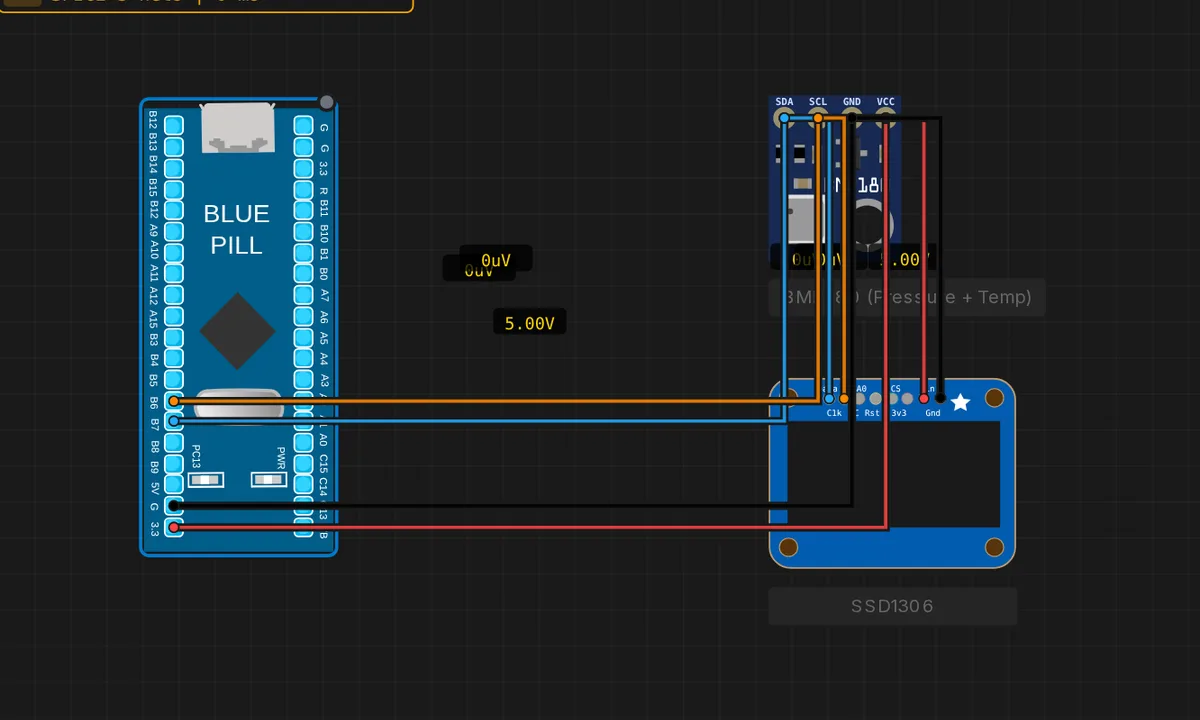
The exact circuit you get when you open this example — already wired, ready to run.
The sketch
// STM32 Blue Pill (F103) — Weather station: BMP280 + SSD1306 on one I2C bus
// Wiring: both devices SDA -> PB7, SCL -> PB6, VCC -> 3V3, GND -> GND
// Requires: Adafruit BMP280 Library, Adafruit Unified Sensor, Adafruit SSD1306, Adafruit GFX Library
#include <Wire.h>
#include <Adafruit_BMP280.h>
#include <Adafruit_GFX.h>
#include <Adafruit_SSD1306.h>

Adafruit_BMP280 bmp;
Adafruit_SSD1306 display(128, 64, &Wire, -1);

void setup() {
  Serial.begin(115200);
  Wire.begin();
  if (!bmp.begin(0x76)) Serial.println("BMP280 not found");
  if (!display.begin(SSD1306_SWITCHCAPVCC, 0x3C)) Serial.println("OLED not found");
  display.setTextColor(SSD1306_WHITE);
  Serial.println("Weather station ready");
}

void loop() {
  float t = bmp.readTemperature();
  float p = bmp.readPressure() / 100.0F;   // hPa
  display.clearDisplay();
  display.setTextSize(1); display.setCursor(0, 0);
  display.println("sensbench Weather");
  display.setTextSize(2); display.setCursor(0, 16);
  display.print(t, 1); display.println(" C");
  display.setTextSize(1); display.setCursor(0, 52);
  display.print(p, 1); display.print(" hPa");
  display.display();
  Serial.print("T="); Serial.print(t); Serial.print(" C  P="); Serial.print(p); Serial.println(" hPa");
  delay(1000);
}
How it works
This is the BMP280 and OLED examples combined on one bus: the BMP280 at 0x76 supplies temperature and pressure, the SSD1306 at 0x3C renders them. Setup initializes both and prints a per-device failure line without hanging — a fail-soft pattern that suits multi-device builds.
The loop reads the sensor, then redraws the entire OLED frame: a 1x header line, the temperature in 2x text, and pressure in hPa below. The Serial Monitor mirrors the same values, so the sketch doubles as a headless logger. The 1-second refresh matches the BMP280’s normal-mode update rate.
Before you build it for real
Two devices on one bus means two addresses must not collide — the BMP280 can be 0x76 or 0x77 (SDO pin), the OLED 0x3C or 0x3D (address resistor). This sketch assumes 0x76 and 0x3C; if either is wrong, the fail-soft messages identify it. Powering both from 3V3 is fine at these currents, but a real build should decouple each module’s VCC with 100 nF — the OLED’s refresh bursts can otherwise inject noise into the BMP280’s readings. And the sensor’s pressure accuracy depends on ventilation, not just wiring: a weather station sealed in a case reads stale pressure until it can equalize with the room.
Get the parts
Related examples
FAQ
How do two I2C devices share one bus?
I2C is a shared two-wire bus where every device has a unique 7-bit address — the BMP280 here answers at 0x76, the OLED at 0x3C. The master sends the address first; only the addressed device responds. Both hang off the same SDA (PB7) and SCL (PB6) lines with pull-ups, and the bus needs no extra wiring per device.
What happens if one device fails to initialize?
The sketch prints “BMP280 not found” or “OLED not found” but keeps going — unlike the single-device examples, it does not hang. The other device keeps working, and the serial messages tell you which one is missing. This fail-soft pattern is what you want when combining peripherals.