
[STM32 + Arduino] Serial Link
[STM32 + Arduino] Serial Link is a runnable microcontroller simulation example on SensBench — open the wired circuit, inspect the code, and compile real firmware in your browser, no install needed. Last updated Aug 14, 2026.
FREE SIMULATOR EXAMPLE · INTERMEDIATE
[STM32 + Arduino] Serial Link
This example sends PING n messages from an STM32 Blue Pill’s USART1 (PA9 TX) to an Arduino Uno’s serial input (pin 0 RX) at 9600 baud — a two-board serial link over one wire plus ground. It is the minimal cross-board UART demo.
| Board | STM32 Blue Pill (STM32F103C8, Cortex-M3, 72 MHz) |
|---|---|
| Difficulty | intermediate |
| Category | communication |
| Libraries | None — just the Arduino core |
| Runs in | Sensbench browser simulator — free, no account |
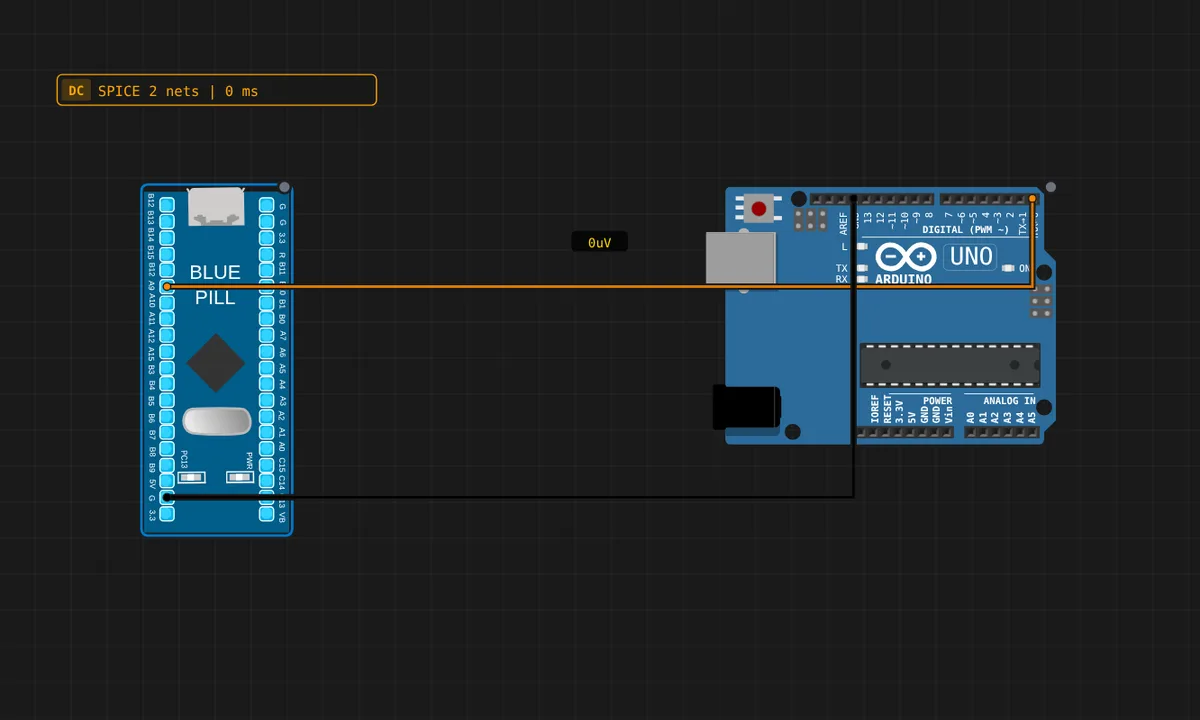
The exact circuit you get when you open this example — already wired, ready to run.
The sketch
// STM32 Blue Pill — sends PING over USART1 (PA9 = TX).
// Wiring: STM32 PA9 -> Uno pin 0 (RX),  STM32 GND -> Uno GND.
unsigned long n = 0;
void setup() {
  Serial.begin(9600);   // USART1
  pinMode(PC13, OUTPUT);
}
void loop() {
  n++;
  Serial.print("PING ");
  Serial.println(n);
  digitalWrite(PC13, n % 2 ? HIGH : LOW);
  delay(1000);
}
How it works
The Blue Pill’s USART1 TX lives on PA9, and this sketch sends PING n every second at 9600 baud — deliberately slower than the 115200 used elsewhere because the 5 V-logic Uno receiver and breadboard wiring favor the forgiving rate. The PC13 LED toggles with the counter as a heartbeat.
The wiring is STM32 PA9 (TX) to Uno pin 0 (RX), with both grounds tied. Serial is point-to-point here: TX on one board, RX on the other, no sharing. The 1-second cadence keeps the link readable and leaves the CPU nearly idle — a pattern that scales to longer telemetry payloads.
Before you build it for real
Serial links have three classic failure modes, all hidden by the simulator: miswired TX/RX (TX must go to RX, never TX-to-TX), missing common ground (the level has no reference), and baud mismatch (both ends must agree exactly — 9600 vs 115200 looks like garbage). The 3.3 V TX from the STM32 reads as a valid HIGH on the Uno’s 5 V UART receiver, which usually works, but a true bidirectional link needs level shifting. And Serial.print() at 9600 baud is slow: each character takes ~1 ms on the wire, so a long burst can stall the loop if you forget the pacing.
Get the parts
Related examples
FAQ
Why 9600 baud instead of 115200?
The Uno’s hardware serial is reliable at 9600 baud on its 16 MHz clock; 115200 works on AVR but leaves less timing margin, and cross-board links over breadboard wires prefer the slower, more forgiving speed. Both boards must agree exactly — a one-baud mismatch corrupts every byte.
What does the Uno do with the PING messages?
The Uno side in this example is the receiver: its pin 0 (RX) listens to the STM32’s USART1 TX. The data crosses the wire at 9600 baud and appears in whatever sketch the Uno runs — the demo’s point is the link itself, not the payload.