
TFT ILI9341 Display
TFT ILI9341 Display is a runnable microcontroller simulation example on SensBench — open the wired circuit, inspect the code, and compile real firmware in your browser, no install needed. Last updated Aug 14, 2026.
FREE SIMULATOR EXAMPLE · INTERMEDIATE
TFT ILI9341 Display
This example drives a 240×320 ILI9341 color TFT from an Arduino Uno over hardware SPI: a static header with a color palette bar up top, then a bouncing-ball animation inside a bordered play-field. It uses the same Adafruit ILI9341 and Adafruit GFX libraries you would install for real hardware, so the drawing calls transfer directly.
| Board | Arduino Uno (ATmega328P, 16 MHz, 5 V logic) |
|---|---|
| Difficulty | intermediate |
| Category | displays |
| Libraries | Adafruit GFX Library, Adafruit ILI9341 |
| Runs in | Sensbench browser simulator — free, no account |
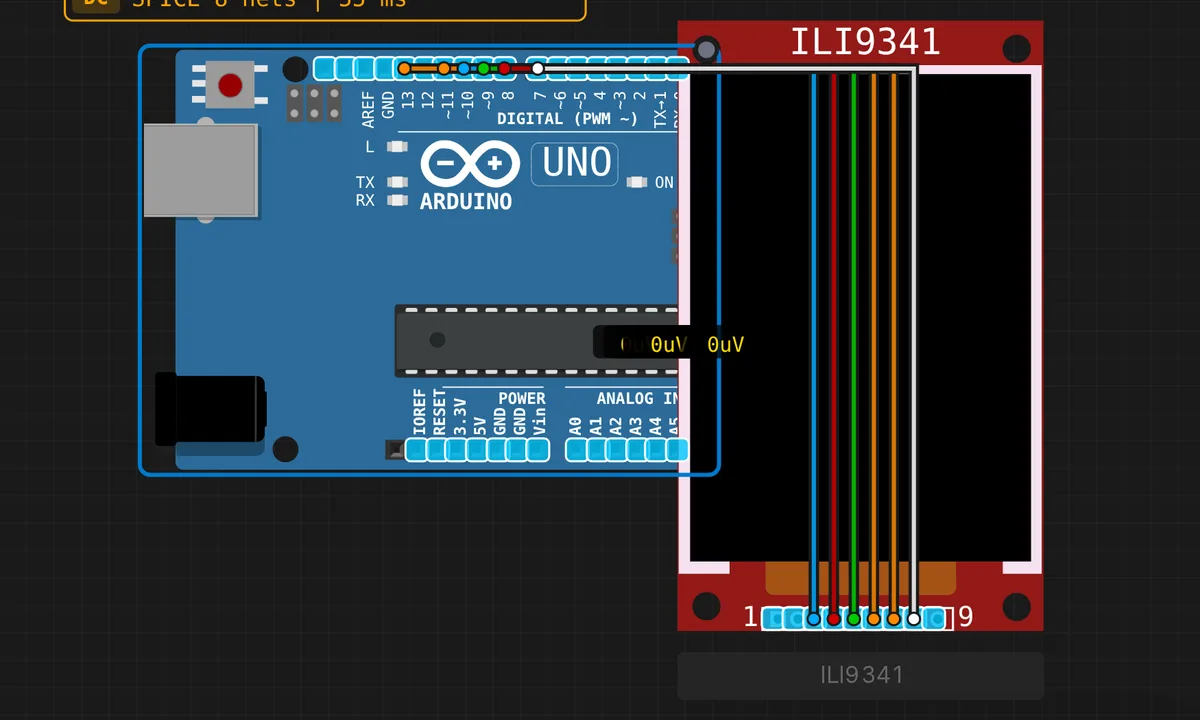
The exact circuit you get when you open this example — already wired, ready to run.
The sketch
// TFT ILI9341 Display Demo (240x320)
// Library: Adafruit ILI9341 + Adafruit GFX
// Connect: CS=10, DC/RS=9, RST=8, LED=7, MOSI=11(SPI), SCK=13(SPI)

#include <Adafruit_GFX.h>
#include <Adafruit_ILI9341.h>
#include <SPI.h>

#define TFT_CS   10
#define TFT_DC    9
#define TFT_RST   8
#define TFT_LED   7

Adafruit_ILI9341 tft(TFT_CS, TFT_DC, TFT_RST);

// Background color: blue (visible on dark simulator canvas)
#define BG_COLOR 0x001F

// Ball state
int ballX = 120, ballY = 200;
int ballDX = 3, ballDY = 2;
const int BALL_R = 10;

// Play-field boundaries
const int FX = 5, FY = 110, FW = 230, FH = 200;

void drawStaticUI() {
  tft.fillScreen(BG_COLOR);

  // Title
  tft.setTextSize(3);
  tft.setTextColor(tft.color565(255, 220, 0));
  tft.setCursor(20, 10);
  tft.print("SENSBENCH TFT");

  // Subtitle
  tft.setTextSize(2);
  tft.setTextColor(tft.color565(180, 180, 255));
  tft.setCursor(30, 50);
  tft.print("ILI9341 Demo");

  // Color palette bars
  tft.fillRect(10, 82, 70, 18, tft.color565(220, 50, 50));
  tft.fillRect(85, 82, 70, 18, tft.color565(50, 200, 50));
  tft.fillRect(160, 82, 70, 18, tft.color565(50, 100, 240));

  // Play-field border
  tft.drawRect(FX, FY, FW, FH, tft.color565(80, 80, 130));
}

void setup() {
  pinMode(TFT_LED, OUTPUT);
  digitalWrite(TFT_LED, HIGH);

  tft.begin();
  drawStaticUI();
}

void loop() {
  // Erase old ball
  tft.fillCircle(ballX, ballY, BALL_R, BG_COLOR);

  // Update position
  ballX += ballDX;
  ballY += ballDY;

  // Bounce off field borders
  if (ballX < FX + BALL_R + 1 || ballX > FX + FW - BALL_R - 1) ballDX = -ballDX;
  if (ballY < FY + BALL_R + 1 || ballY > FY + FH - BALL_R - 1) ballDY = -ballDY;

  // Draw ball
  tft.fillCircle(ballX, ballY, BALL_R, tft.color565(255, 140, 0));

  delay(30);
}
How it works
The pin map comes straight from the sketch header: CS on 10, DC on 9, RST on 8, and the backlight LED on 7, which setup() drives HIGH. MOSI on 11 and SCK on 13 are the Uno’s hardware SPI pins — the three-argument constructor Adafruit_ILI9341 tft(TFT_CS, TFT_DC, TFT_RST) is what tells the library to use hardware SPI instead of bit-banging.
Colors are 16-bit 5-6-5 packed values: tft.color565(255, 140, 0) converts familiar RGB888 into the format the controller expects, and the background constant 0x001F is pure blue written directly in that encoding. The static UI — title, subtitle, three palette bars, and the play-field border — is drawn once in drawStaticUI() and never repainted.
The animation loop is a lesson in SPI economy. A full fillScreen() means pushing 240 x 320 x 16 bits — about 1.2 Mbit — over the bus on a 16 MHz AVR, which sweeps visibly. Instead the loop erases only the old ball with fillCircle(ballX, ballY, BALL_R, BG_COLOR), updates the position, flips ballDX/ballDY at the field borders, and redraws. Minimal traffic is what keeps a 30 ms frame time smooth on an Uno.
Before you build it for real
The big one is voltage: the ILI9341 is a 3.3 V device, and the Uno’s MOSI, SCK and CS lines swing a full 0-5 V. Many red breakout modules carry a regulator and series resistors that make them 5 V tolerant — a bare panel is not, and 5 V logic will damage it. Check your module before wiring. Second, the backlight on pin 7: some modules draw close to or beyond the 20 mA per-pin budget of the ATmega328P, so on real hardware consider tying LED to the module’s intended supply instead of a GPIO. And remember the Uno has 2 KB of RAM — there is no framebuffer anywhere; the library streams every pixel, which is exactly why the sketch repaints only what changed.
Get the parts
Related examples
FAQ
The shop's 1.44 inch TFT is an ST7735 — does this sketch still apply?
The wiring concept is identical — CS, DC, RST plus hardware MOSI and SCK — but the controller differs, so you would initialize Adafruit_ST7735 instead of Adafruit_ILI9341. The resolution is also 128×160 rather than 240×320, so re-center the coordinates. All the Adafruit_GFX drawing calls — fillRect, fillCircle, setCursor — are the same across both drivers.
Why not just clear the whole screen every frame?
A full fillScreen() pushes 240 x 320 x 16 bits — about 1.2 Mbit — over SPI on a 16 MHz AVR, and you would watch the repaint sweep down the display. Erasing only the ball’s previous position keeps SPI traffic tiny, which is what makes the 30 ms frame time actually achievable on an Uno.