
Traffic Light
Traffic Light is a runnable microcontroller simulation example on SensBench — open the wired circuit, inspect the code, and compile real firmware in your browser, no install needed. Last updated Aug 14, 2026.
FREE SIMULATOR EXAMPLE · BEGINNER
Traffic Light
This example cycles three LEDs through a traffic-light pattern on Arduino Uno pins 13 (red), 12 (yellow) and 11 (green): red for three seconds, yellow for one, green for three, yellow once more, repeat. Open it and press play — the whole intersection runs on eight lines of digitalWrite and delay.
| Board | Arduino Uno (ATmega328P, 16 MHz, 5 V logic) |
|---|---|
| Difficulty | beginner |
| Category | basics |
| Libraries | None — just the Arduino core |
| Runs in | Sensbench browser simulator — free, no account |
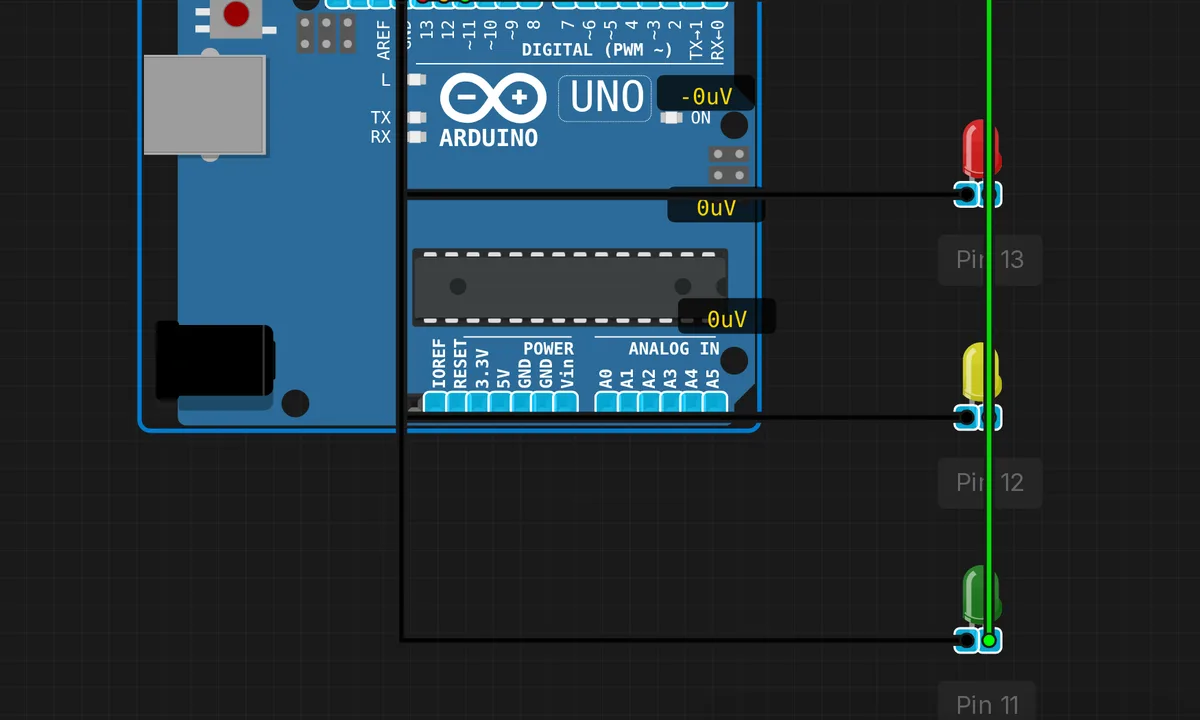
The exact circuit you get when you open this example — already wired, ready to run.
The sketch
// Traffic Light Simulator
// Red -> Yellow -> Green -> Yellow -> Red

const int RED_PIN = 13;
const int YELLOW_PIN = 12;
const int GREEN_PIN = 11;

void setup() {
  pinMode(RED_PIN, OUTPUT);
  pinMode(YELLOW_PIN, OUTPUT);
  pinMode(GREEN_PIN, OUTPUT);
}

void loop() {
  // Red light
  digitalWrite(RED_PIN, HIGH);
  delay(3000);
  digitalWrite(RED_PIN, LOW);

  // Yellow light
  digitalWrite(YELLOW_PIN, HIGH);
  delay(1000);
  digitalWrite(YELLOW_PIN, LOW);

  // Green light
  digitalWrite(GREEN_PIN, HIGH);
  delay(3000);
  digitalWrite(GREEN_PIN, LOW);

  // Yellow light again
  digitalWrite(YELLOW_PIN, HIGH);
  delay(1000);
  digitalWrite(YELLOW_PIN, LOW);
}
How it works
Three constants map colors to pins — red on 13, yellow on 12, green on 11 — and setup() sets all three as outputs. There is no library and no state variable: the state machine is simply which line of the script is executing. That makes this the ideal second Arduino program after Blink — three outputs and a fixed sequence instead of one toggling pin.
The timings are 3000 ms red, 1000 ms yellow, 3000 ms green, then 1000 ms yellow again before the cycle repeats — the second yellow is what makes it a four-state cycle rather than three. Every wait is a blocking delay(): while the sketch sleeps, the ATmega328P does literally nothing else. Fine for a demo, and the exact habit you will unlearn when you move to millis() timing.
Before you build it for real
On a real breadboard each LED needs a series resistor — the simulator’s LEDs don’t burn, but a bare LED on a 5 V AVR pin overdraws the 20 mA per-pin budget; 220 ohm puts you at a safe ~13 mA. Second, the blocking delay: add a pedestrian-crossing button later and it will be ignored for up to three seconds at a time — that is the point where this pattern must become a millis() state machine. One more quiet note: pins 11, 12 and 13 are the Uno’s SPI bus (MOSI/MISO/SCK), so if you later add SPI hardware to this build, move the lights to other pins.
Get the parts
Related examples
FAQ
How do I add a pedestrian button without breaking the timing?
You cannot bolt it onto this structure — while the sketch sits inside delay(3000), a button press goes unread for up to three seconds. The fix is a millis()-based state machine: record the time of the last transition, compare on every loop pass, and read the button in between. Same pattern, no blocking.
What resistors do the LEDs need on a real Uno?
220 ohm each is the standard choice. A red or yellow LED drops about 2 V, leaving 3 V across the resistor from the 5 V pin — roughly 13 mA, comfortably inside the ATmega328P’s 20 mA per-pin and 200 mA total budget.