
Uno: 7-Segment Counter
Uno: 7-Segment Counter is a runnable microcontroller simulation example on SensBench — open the wired circuit, inspect the code, and compile real firmware in your browser, no install needed. Last updated Aug 14, 2026.
FREE SIMULATOR EXAMPLE · BEGINNER
Uno: 7-Segment Counter
This example counts 0 through 9 on a single-digit 7-segment display driven directly from Arduino Uno pins 2 through 8 — no driver IC, no shift register, just GPIOs and a lookup table. Each digit shows for 800 ms while the Serial Monitor echoes the count, so you can follow the rhythm without even looking at the canvas.
| Board | Arduino Uno (ATmega328P, 16 MHz, 5 V logic) |
|---|---|
| Difficulty | beginner |
| Category | displays |
| Libraries | None — just the Arduino core |
| Runs in | Sensbench browser simulator — free, no account |
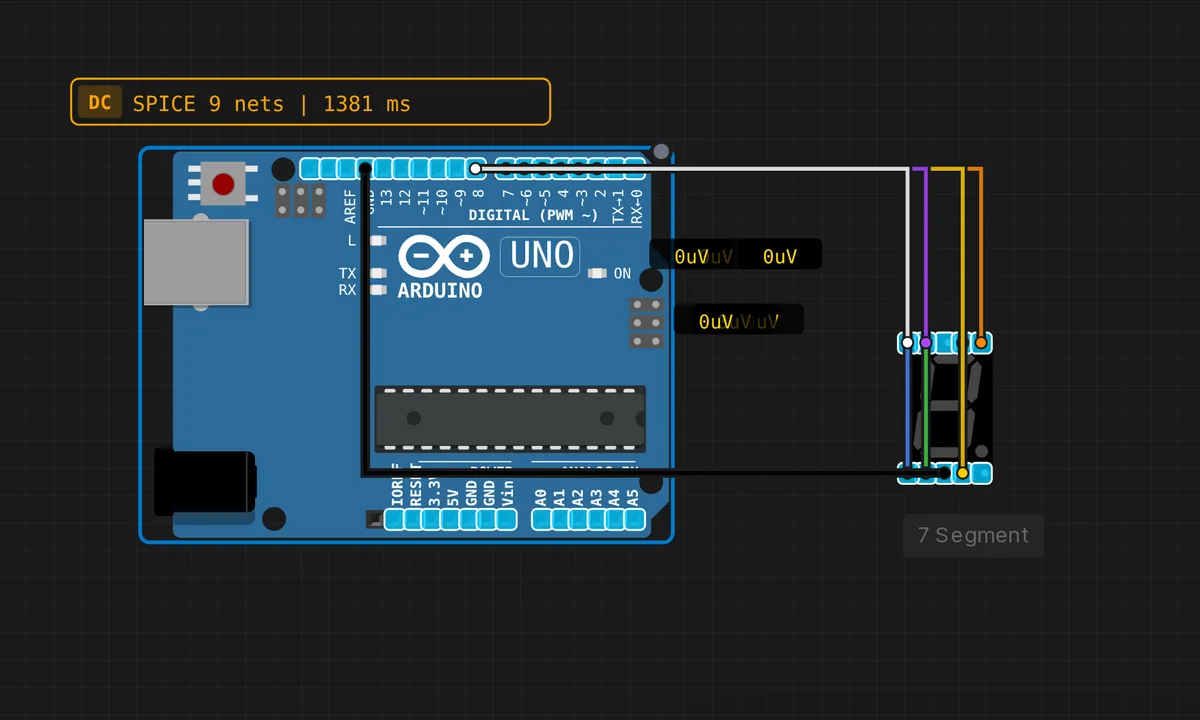
The exact circuit you get when you open this example — already wired, ready to run.
The sketch
// Arduino Uno — 7-Segment Display Counter 0-9
// Segments: a=2, b=3, c=4, d=5, e=6, f=7, g=8
// Common cathode display

// Segment pins: a b c d e f g
const int SEG[7] = {2, 3, 4, 5, 6, 7, 8};

// Digit patterns [a,b,c,d,e,f,g] (1=ON)
const bool DIGITS[10][7] = {
  {1,1,1,1,1,1,0}, // 0
  {0,1,1,0,0,0,0}, // 1
  {1,1,0,1,1,0,1}, // 2
  {1,1,1,1,0,0,1}, // 3
  {0,1,1,0,0,1,1}, // 4
  {1,0,1,1,0,1,1}, // 5
  {1,0,1,1,1,1,1}, // 6
  {1,1,1,0,0,0,0}, // 7
  {1,1,1,1,1,1,1}, // 8
  {1,1,1,1,0,1,1}, // 9
};

void showDigit(int d) {
  for (int i = 0; i < 7; i++)
    digitalWrite(SEG[i], DIGITS[d][i] ? HIGH : LOW);
}

void setup() {
  for (int i = 0; i < 7; i++) pinMode(SEG[i], OUTPUT);
  Serial.begin(9600);
  Serial.println("7-Segment Counter ready");
}

void loop() {
  for (int d = 0; d <= 9; d++) {
    showDigit(d);
    Serial.println(d);
    delay(800);
  }
}
How it works
The sketch keeps everything in two tables: SEG[7] maps segments a through g to pins 2 through 8, and DIGITS[10][7] is the truth table — one row per digit, one bool per segment. showDigit(d) just walks both arrays and calls digitalWrite() seven times. Adding a new symbol, say the letter E for an error state, means adding one row, not touching any logic.
All seven pins are configured as outputs in a single loop in setup(), and the main loop is just a counter: show the digit, print it, delay(800), next. Notice the sketch skips pins 0 and 1 entirely — those are the Uno’s hardware serial RX/TX, and driving a display from them would fight the USB link every time you upload or print.
Before you build it for real
Two things the simulator forgives and real silicon does not. First, this wiring has no series resistor per segment — every segment is an LED, and on a real Uno each lit segment draws current straight from its GPIO. Budget roughly 10 mA per segment with a 220-330 ohm resistor on each line; seven segments at 20 mA is 140 mA, uncomfortably close to the ATmega328P’s 200 mA whole-chip limit. Second, the code is written for a common-cathode display, where HIGH means segment on. Wire a common-anode module instead and every digit lights inverted — your 0 becomes a lone middle bar. Check the datasheet before you solder.
Get the parts
Related examples
FAQ
Why does the sketch start at pin 2 instead of pin 0?
Pins 0 and 1 are the Uno’s hardware UART (RX/TX), shared with the USB-serial chip. Driving display segments from them corrupts serial output and can block uploads entirely. Pins 2-8 give you seven contiguous pins free of that conflict.
How do I count past 9?
Two digits need multiplexing: share the seven segment lines between both digits and alternate which common pin is grounded, fast enough that persistence of vision merges them. Or offload the job to a MAX7219 driver and talk to it over SPI. This direct-drive approach stops being practical at two digits.