
Uno: Photoresistor Light Sensor
Uno: Photoresistor Light Sensor is a runnable microcontroller simulation example on SensBench — open the wired circuit, inspect the code, and compile real firmware in your browser, no install needed. Last updated Aug 14, 2026.
FREE SIMULATOR EXAMPLE · BEGINNER
Uno: Photoresistor Light Sensor
This example reads a photoresistor module on analog pin A0 and drives an LED on PWM pin 9 in the opposite direction — the darker the room, the brighter the LED. The Serial Monitor prints the light percentage, the raw ADC value and the PWM duty five times a second, so you can watch the feedback loop close.
| Board | Arduino Uno (ATmega328P, 16 MHz, 5 V logic) |
|---|---|
| Difficulty | beginner |
| Category | sensors |
| Libraries | None — just the Arduino core |
| Runs in | Sensbench browser simulator — free, no account |
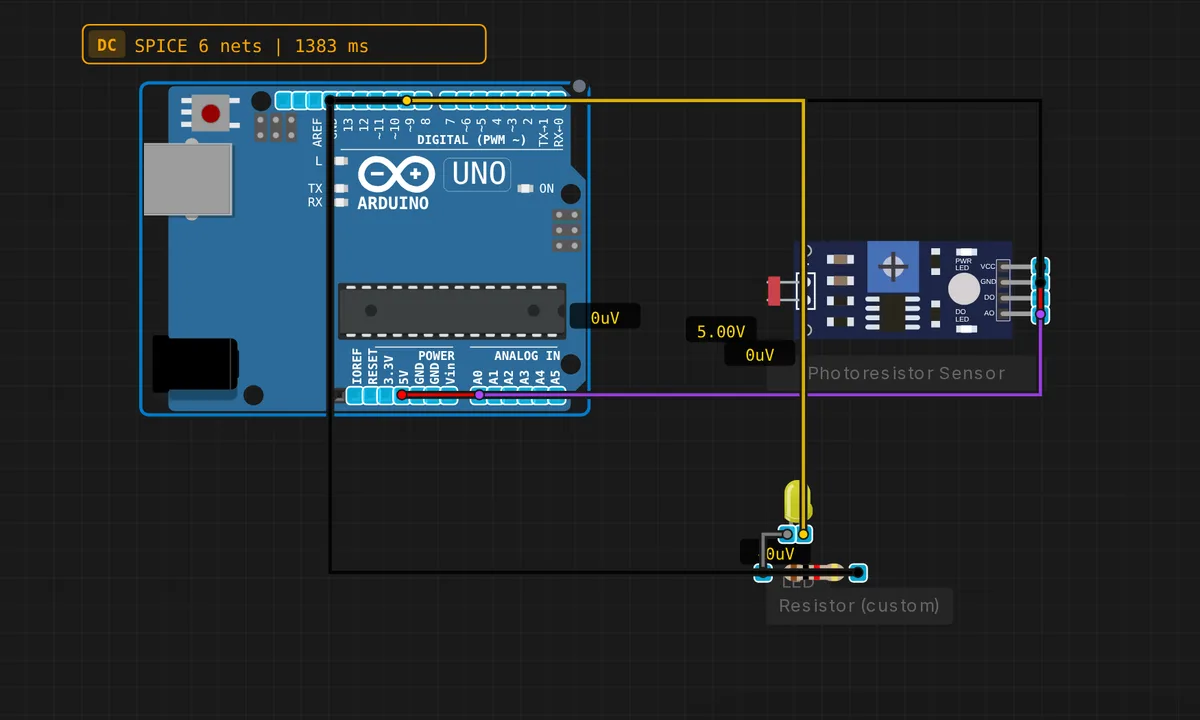
The exact circuit you get when you open this example — already wired, ready to run.
The sketch
// Arduino Uno — Photoresistor Light Sensor + PWM LED
// Sensor : AO → A0  |  VCC → 5V  |  GND → GND
// LED    : pin 9 (PWM), current-limiting resistor 220 Ω

#define PHOTO_PIN A0
#define LED_PIN   9

void setup() {
  Serial.begin(9600);
  pinMode(LED_PIN, OUTPUT);
  Serial.println("Photoresistor demo — try covering the sensor!");
}

void loop() {
  int raw     = analogRead(PHOTO_PIN);          // 0–1023
  int percent = map(raw, 0, 1023, 0, 100);
  // Invert: brighter environment → lower LED brightness
  int ledPWM  = map(raw, 0, 1023, 255, 0);
  analogWrite(LED_PIN, ledPWM);

  Serial.print("Light: "); Serial.print(percent);
  Serial.print("%  ADC="); Serial.print(raw);
  Serial.print("  LED="); Serial.println(ledPWM);
  delay(200);
}
How it works
analogRead(PHOTO_PIN) returns 0-1023 from the Uno’s 10-bit ADC. Two map() calls carry all the logic: one scales the raw count to a 0-100% light level for printing, the other maps the same count to 255, 0 — a reversed output range — so rising ambient light means falling LED drive. analogWrite(LED_PIN, ledPWM) then sets the brightness with the Uno’s roughly 490 Hz PWM on pin 9.
It is a minimal automatic night-light, and the printed triple of numbers is your calibration tool: cover the sensor, note the raw ADC at ‘dark’, shine a torch for ‘bright’, and you know the real span of your specific module. Expect it to be much narrower than 0-1023 — which is exactly what you would tune the map() ranges for on a real build.
Before you build it for real
The code comment says 220 ohm in series with the LED and means it — a bare LED on pin 9 pulls more than the ATmega328P’s 20 mA per-pin budget, and the pin pays for it over time. Second, check which output you wired: photoresistor modules expose AO and DO pins, and only AO carries the analog voltage this sketch reads — DO is a comparator trip point you set with the on-board trimpot, useless for analogRead(). Finally, an LDR is slow and non-linear: perfect for a night-light, unusable as a lux meter.
Get the parts
Related examples
FAQ
Why pin 9 and not any digital pin?
analogWrite() only works on the Uno’s PWM-capable pins — the ones marked with a tilde on the silkscreen: 3, 5, 6, 9, 10 and 11. On a non-PWM pin it silently falls back to fully on above 128 and fully off below it, so the LED would snap between states instead of dimming.
Can I get actual lux values from this?
Not honestly. A photoresistor’s resistance-to-lux curve is non-linear, varies between individual parts, and drifts with temperature — you can calibrate two points and interpolate, but you are building a relative light level, not an instrument. For real lux you want a digital sensor like a BH1750.