
Uno: RGB LED Cycle
Uno: RGB LED Cycle is a runnable microcontroller simulation example on SensBench — open the wired circuit, inspect the code, and compile real firmware in your browser, no install needed. Last updated Aug 14, 2026.
FREE SIMULATOR EXAMPLE · BEGINNER
Uno: RGB LED Cycle
This example drives a common-cathode RGB LED from three PWM pins of the Arduino Uno — red on 9, green on 10, blue on 11 — stepping through seven colors at 600 ms apiece while the Serial Monitor names each one. It is the natural second sketch after blink: everything is still delay-simple, but the output is duty cycle instead of on/off.
| Board | Arduino Uno (ATmega328P, 16 MHz, 5 V logic) |
|---|---|
| Difficulty | beginner |
| Category | basics |
| Libraries | None — just the Arduino core |
| Runs in | Sensbench browser simulator — free, no account |
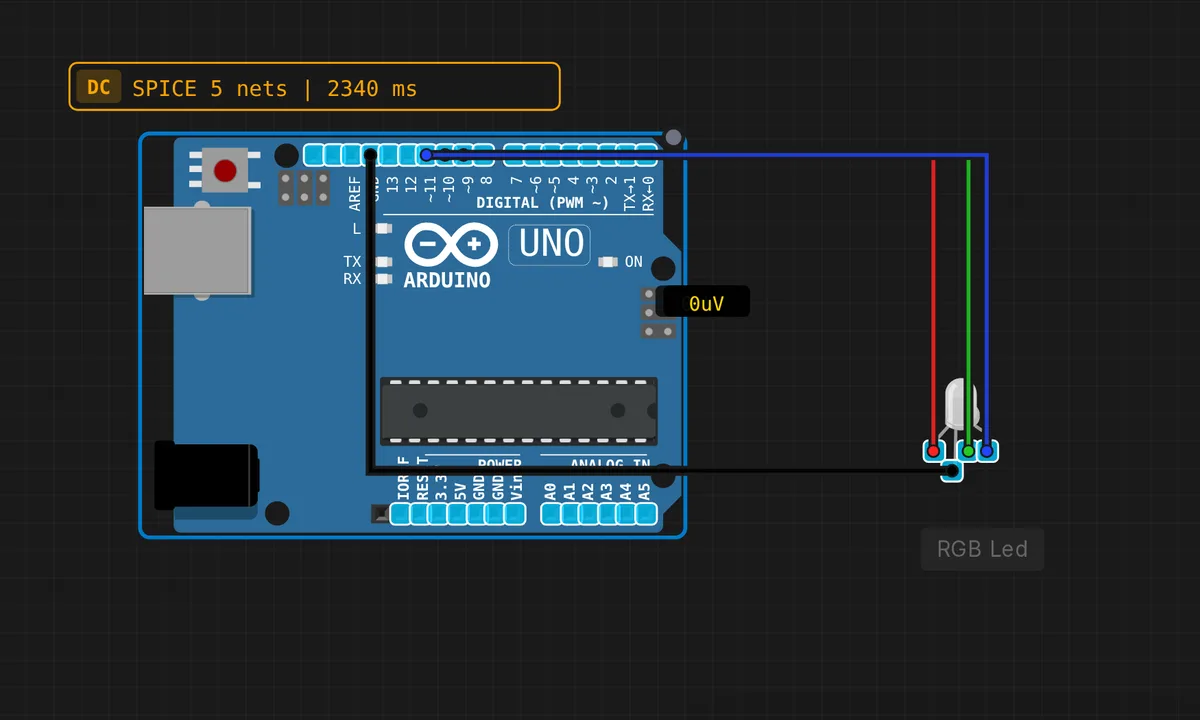
The exact circuit you get when you open this example — already wired, ready to run.
The sketch
// Arduino Uno — RGB LED color cycle using PWM

#define R_PIN 9
#define G_PIN 10
#define B_PIN 11

void setColor(int r, int g, int b) {
  analogWrite(R_PIN, r);
  analogWrite(G_PIN, g);
  analogWrite(B_PIN, b);
}

void setup() {
  Serial.begin(9600);
  Serial.println("RGB LED Cycle — 7 colors");
}

void loop() {
  setColor(255,   0,   0); Serial.println("RED");     delay(600);
  setColor(  0, 255,   0); Serial.println("GREEN");   delay(600);
  setColor(  0,   0, 255); Serial.println("BLUE");    delay(600);
  setColor(255, 255,   0); Serial.println("YELLOW");  delay(600);
  setColor(  0, 255, 255); Serial.println("CYAN");    delay(600);
  setColor(255,   0, 255); Serial.println("MAGENTA"); delay(600);
  setColor(255, 255, 255); Serial.println("WHITE");   delay(600);
  setColor(  0,   0,   0); Serial.println("OFF");     delay(300);
}
How it works
setColor(r, g, b) writes the three channels with analogWrite(), which on these pins produces a ~490 Hz square wave whose duty cycle — 0 to 255 — sets each die’s brightness. setColor(255, 255, 0) lights red and green fully and blue not at all; your eye mixes that as yellow. The seven stops are just the corners and edges of the RGB cube — no color math required.
Notice that setup() never calls pinMode() on the LED pins — analogWrite() claims its pin mode on first use. The loop is a flat script: set a color, print its name, delay(600), move on. The final setColor(0, 0, 0) with a shorter 300 ms pause gives the cycle a visual beat — all dark, then red again — which reads as a loop boundary instead of an eighth color.
Before you build it for real
The simulated LED has no current-limiting resistors, which is the fastest way to cook real hardware: each channel of a breadboard RGB needs its own ~220 Ω resistor, because a bare red die on a 5 V pin tries to pull well past the ATmega328P’s 20 mA per-pin rating. Check which polarity family you bought before wiring: this sketch assumes common-cathode (longest leg to GND, 255 = full on). With a common-anode module the logic inverts — common leg to 5 V, and you write 255 minus each value, otherwise 255,255,255 gives darkness and 0,0,0 gives blinding white. Full white here is three channels at roughly 60 mA combined, comfortable inside the chip’s 200 mA total budget; start adding more LEDs and that budget becomes the constraint.
Get the parts
Related examples
FAQ
How do I get colors beyond these seven?
Pick any per-channel values from 0 to 255 — (255, 80, 0) is a decent orange, (128, 0, 255) a violet. For smooth fades, ramp the numbers in a for loop with a short delay instead of jumping corner to corner; the 600 ms steps here are deliberately chunky so you can follow along.
Why pins 9, 10 and 11?
They are three of the Uno’s six PWM pins — the ones marked ~ on the silkscreen: 3, 5, 6, 9, 10, 11. Call analogWrite() on any other pin and you get full-on for values of 128 and up and full-off below that, which makes for a deeply disappointing color cycle.