
Z80 Comet Scanner
Z80 Comet Scanner is a runnable microcontroller simulation example on SensBench — open the wired circuit, inspect the code, and compile real firmware in your browser, no install needed. Last updated Aug 14, 2026.
FREE SIMULATOR EXAMPLE · INTERMEDIATE
Z80 Comet Scanner
This example runs a two-LED comet sweep across 8 LEDs on a programmable Z80 — hand-written Z80 assembly (scanner.s), assembled and executed on the chip itself. No Arduino: the CPU runs standalone from a regulated supply.
| Board | Programmable Z80 chip (Zilog Z80, standalone — no Arduino) |
|---|---|
| Difficulty | intermediate |
| Category | circuits |
| Libraries | None — just the Arduino core |
| Runs in | Sensbench browser simulator — free, no account |
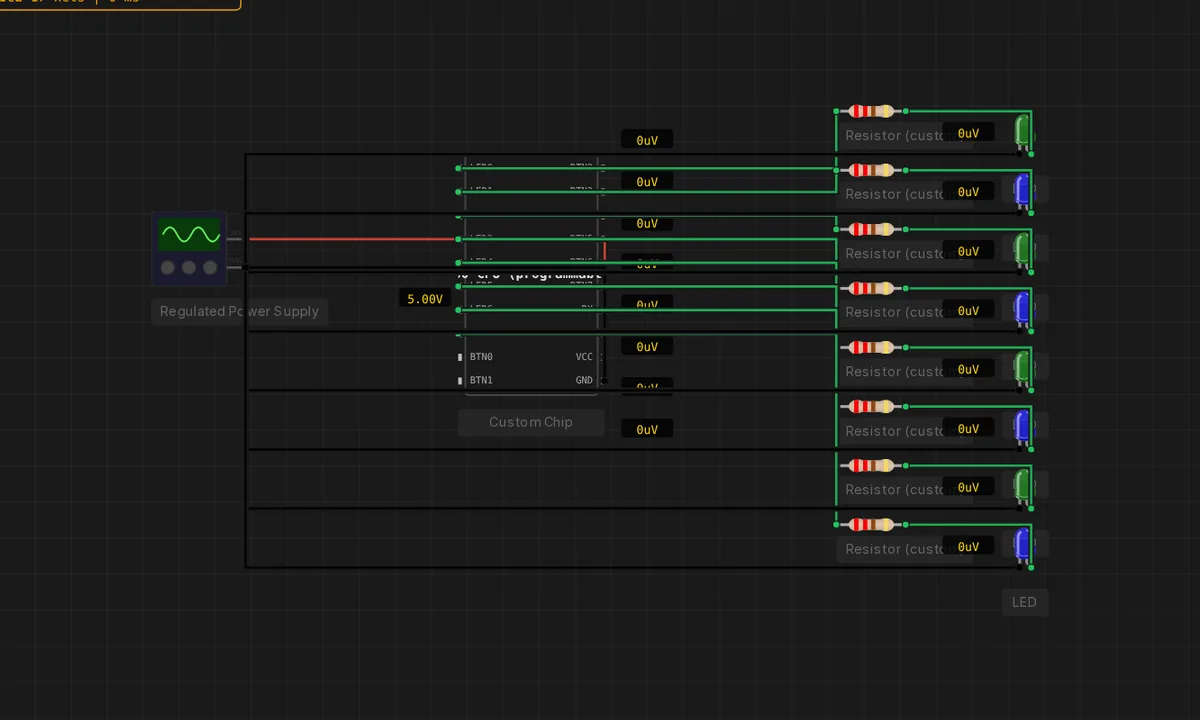
The exact circuit you get when you open this example — already wired, ready to run.
The sketch
 Z80 "comet" scanner — a TWO-LED pair sweeps across the 8 LEDs.
;
; Same z80-cpu chip as the single-bit Larson, but the start pattern is
; 0x03 (two adjacent LEDs) and the sweep is faster. RLCA rotates the pair
; left and wraps it around the ends — a brighter, quicker Knight Rider.
; To slow it down, raise the "LD C, 40" delay; to widen the comet, change
; the "LD A, 0x03" start pattern.

        ORG 0x0000

        LD   SP, 0xBFFF        ; stack at top of RAM
        LD   A, 0x03           ; A = two adjacent LEDs (LED0 + LED1)

loop:
        LD   (0xC000), A       ; write to LED port
        PUSH AF
        CALL delay
        POP  AF
        RLCA                   ; rotate the pair left (wraps at the ends)
        JR   loop

; -- delay: faster sweep than the single-bit Larson ---------------------
delay:
        LD   C, 40
outer:
        LD   B, 0              ; 0 = 256 inner iterations
inner:
        DJNZ inner
        DEC  C
        JR   NZ, outer
        RET
How it works
The Z80 executes a hand-written assembly program that shifts a two-bit pattern across an 8-LED output port — the comet’s head and tail sweeping left and right. The LED port is memory-mapped IO: each OUT instruction writes the current pattern to the pins.
The sweep timing is instruction-counted — a delay loop of decrements and jumps sets the speed, since the bare Z80 has no timer. The assembly source is editable in the chip’s editor, and the backend assembles it on every run, so the hardware and the code are genuinely one thing.
Before you build it for real
The Z80 program owns the whole machine: there is no operating system, no library, no watchdog — an infinite loop is the entire program, and a bug means the chip hangs, which is debugging at its most honest. The LED port is bare IO: the emulator models the port register driving the LED pins directly, so real hardware would still need current-limiting resistors per LED. And the assembly is position-dependent: the program expects to sit at a specific address, a constraint that shaped the entire 8-bit era.
Related examples
FAQ
Why write in Z80 assembly?
The Z80 chip in this example is programmable — the assembly source (scanner.s) is assembled by the backend and loaded into the chip. Assembly is the Z80’s native language: the example exists to show the CPU running real Z80 machine code, not Arduino-style abstractions.
What makes it a comet instead of a Larson?
The classic Larson scanner moves one LED; this variant moves two adjacent LEDs with a trailing gap, which reads as a comet with a tail. The description calls it out because the two-LED pattern is a deliberate twist on the single-bit original.