
Blog
Pico I2C Scanner: Sweep the Bus, Find What’s Alive

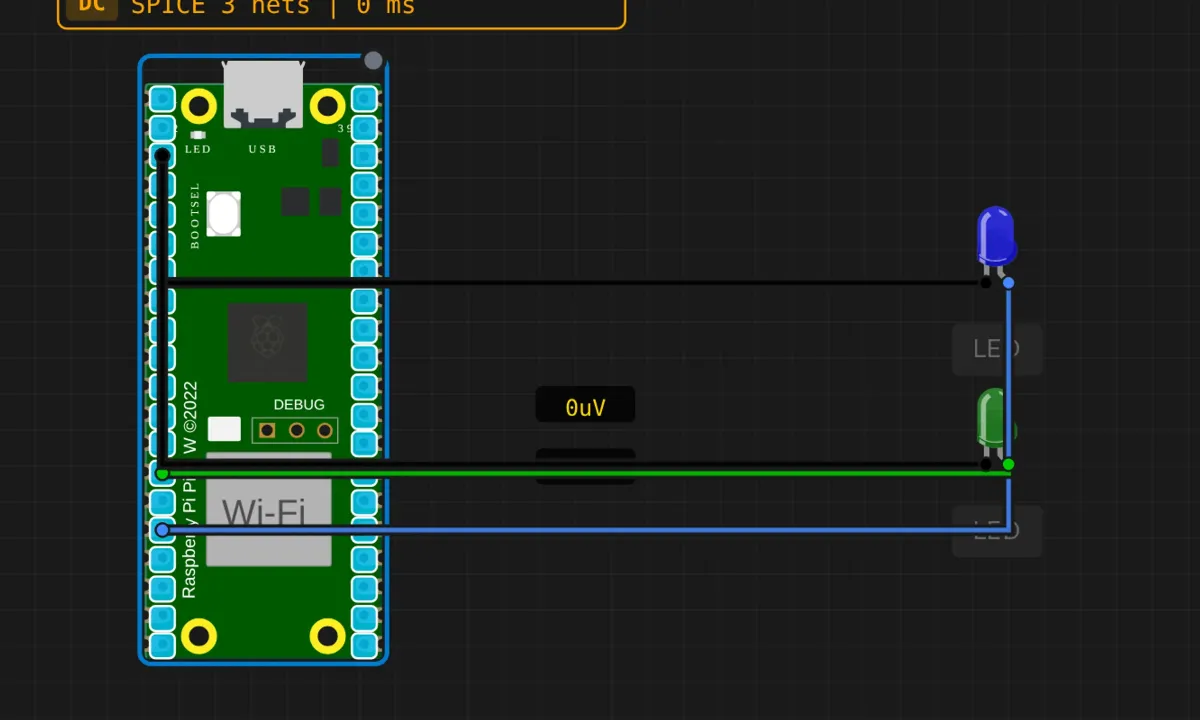
The I2C scanner is the same tool on every platform: knock on all 126 valid addresses, print which ones answer. We built it for the Arduino Uno already; this is the Pico port. Same Wire library, same two-line probe, different pins — and that pin difference is most of what this article is for, because the Pico’s I2C situation is genuinely more flexible and genuinely more confusing.
The circuit adds two status LEDs — a blue one meant to blink while scanning, a green one meant to light when something answers. I say “meant to” because the sketch never drives them. We’ll talk about that too.
The circuit
- GP12 → blue LED anode; cathode → GND (scan-in-progress indicator)
- GP10 → green LED anode; cathode → GND (device-found indicator)
- The I2C bus itself: SDA = GP4, SCL = GP5 — nothing attached to them in this example
Notice what’s not on the canvas: no OLED, no sensor, no EEPROM. This scanner runs against an empty bus. The result is a foregone conclusion — “Found 0 device(s)” — and that’s fine. You’re building the diagnostic tool here; the RTC and EEPROM projects that follow are where it earns its keep.
The sketch
// Raspberry Pi Pico — I2C bus scanner
// Default bus: I2C0, SDA=GP4, SCL=GP5
// (The two status LEDs on GP10/GP12 are wired but NOT
//  driven by this sketch — patch below.)

#include <Wire.h>

void setup() {
  Serial.begin(115200);
  delay(500);
  Wire.begin();   // Pico default: SDA=GP4, SCL=GP5 (I2C0)
  Serial.println("=== Pico I2C Scanner ===");
  Serial.println("Bus: I2C0  SDA=GP4  SCL=GP5");
  Serial.println();
}

void loop() {
  Serial.println("Scanning I2C bus...");
  int found = 0;

  for (byte addr = 1; addr < 127; addr++) {
    Wire.beginTransmission(addr);
    byte error = Wire.endTransmission();

    if (error == 0) {
      found++;
      Serial.print("  Device found at 0x");
      if (addr < 16) Serial.print("0");
      Serial.print(addr, HEX);

      // tag the usual suspects
      switch (addr) {
        case 0x27: Serial.print("  (LCD backpack)"); break;
        case 0x3C: Serial.print("  (SSD1306 OLED)"); break;
        case 0x48: Serial.print("  (Temperature sensor)"); break;
        case 0x50: Serial.print("  (EEPROM)"); break;
        case 0x68: Serial.print("  (DS1307 RTC)"); break;
        default: break;
      }
      Serial.println();
    }
  }

  Serial.print("Scan complete. Found ");
  Serial.print(found);
  Serial.println(" device(s).");
  Serial.println();
  delay(5000);   // rescan every 5 s
}
Run it, open the serial monitor, and you get a full pass every five seconds, finding nothing, forever. That empty result is correct — there is nothing on GP4/GP5 to answer.
What the Pico does differently
On the Uno, I2C pins are fixed: A4/A5, end of discussion. The RP2040 has two I2C peripherals (I2C0 and I2C1) and a pin mux that can route them to many different GPIO pairs. Wire defaults to I2C0 on GP4/GP5; Wire1 exists for the second peripheral. With the Earle Philhower core you can even relocate them — Wire.setSDA(pin) / Wire.setSCL(pin) before Wire.begin(). Powerful, and a classic source of “worked on my breadboard, dead on my PCB” when the PCB used different pins and nobody updated the code. The fix is always the same: run the scanner, see nothing, check the pin map.
The scan mechanics are identical to the Uno version: beginTransmission(addr) + endTransmission(), return code 0 means the device pulled SDA low for the ACK bit. Presence, not health — a chip can ACK its address and still be misconfigured or half-dead.
Honest notes
- The two LEDs are decorative unless you finish the job. The source article wires a “scanning” LED and a “found” LED, then quietly admits the code to drive them isn’t in the sketch. If you want them working:
pinMode(12, OUTPUT); pinMode(10, OUTPUT);in setup,digitalWrite(12, HIGH)before the loop andLOWafter it, anddigitalWrite(10, HIGH)inside theerror == 0branch (with aLOWat scan start to reset). Four lines. The exercise is worth doing — “the schematic promised it, the firmware never delivered” is a category of bug you’ll meet professionally. - “No pull-ups needed” is simulator optimism. The Wire library enables the RP2040’s internal pull-ups, and they’re weak — tens of kilo-ohms, where I2C wants something like 4.7kΩ for a healthy rise time. In the sim, and on a real board with one device and short wires, it usually works. On a real bus with three devices and a nest of jumper wires, weak pull-ups show up as intermittent NAKs that come and go with cable movement. Real hardware: add proper pull-ups.
- The
delay(5000)between scans is fine — here. Blocking delays are only a sin when something else needs the CPU, and nothing does between scans. But if you extend this into a live bus monitor, themillis()pattern from the serial echo project is the right skeleton. - An empty scan teaches you less than a populated one. Load any of the I2C examples that put a chip on the bus (the RTC sits at 0x68, the EEPROM at 0x50) and re-run — watching the scanner find a known address is the actual confidence-builder. Zero is a valid result; it’s just a boring one.
When the scan lies to you
- Found 0, but you KNOW a device is attached (real hardware) → SDA/SCL swapped, missing pull-ups, or the device isn’t powered. On the Pico also check you’re on the pins Wire is actually using — GP4/GP5 unless you moved them.
- Found at an address you didn’t expect → solder jumpers on the module picked the alternate address. 0x3C vs 0x3D, 0x76 vs 0x77 — one blob of solder apart.
- Same address listed is NOT the chip you think → the address table is a hint, not an ID. Two unrelated chips can share an address; the ACK tells you something answered, not what.
- Scan hangs mid-run on real hardware → SDA shorted low. Some Wire versions block forever waiting for the bus to free up. Check wiring before suspecting code.
Where to go from here
The natural next step is giving the scanner something to find: the DS1307 RTC project puts a chip at 0x68 on this same bus, and the EEPROM project adds 0x50. Run the scanner after wiring either of them and watch the label print. Then wire the status LEDs into the code for real, and you’ve built a self-contained bus probe — plug it into a mystery bus, it tells you what’s alive. That’s a tool worth keeping in your examples folder.
Open the simulator and load the Pico I2C scanner example. Let it find nothing a few times — then add the four lines that bring the status LEDs to life. Debugging the gap between a schematic and its firmware is the skill; the scanner is just the excuse.