
Blog
Pico DS1307 RTC Clock: Real Time Over I2C, Virtual Chip Included

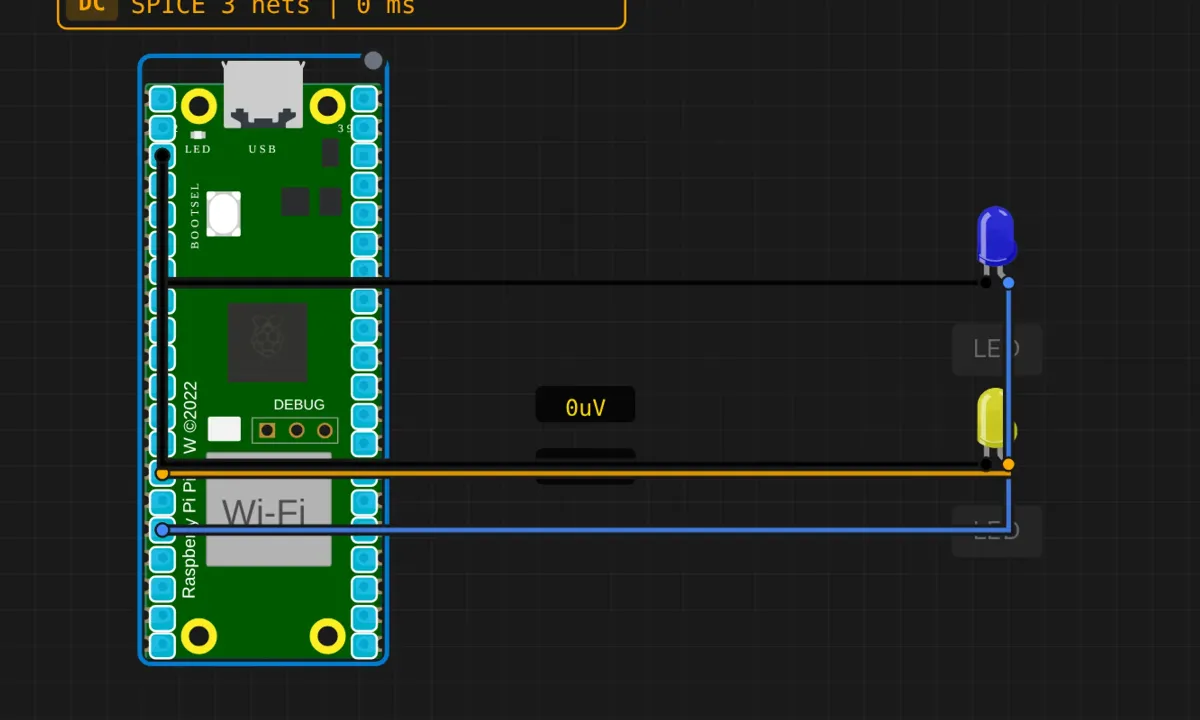
The DS1307 RTC on the Pico is the same chip, the same address (0x68), the same seven BCD registers, and the same register-pointer dance we did on the Arduino Uno. What’s different is everything around it: the bus lives on GP4/GP5 instead of A4/A5, the serial port runs at 115200 instead of 9600 — and in this example, the chip itself is virtual, so the whole “circuit” is two LEDs and a Pico.
If you haven’t done the Uno version, do that one first — it explains BCD and the clock-halt bit properly. This one focuses on the Pico specifics and on a couple of claims in the original circuit description that don’t survive scrutiny.
The circuit (such as it is)
- GP12 → blue LED anode; cathode → GND
- GP10 → yellow LED anode; cathode → GND
- The DS1307: virtual — the simulator connects it internally to the I2C bus (SDA=GP4, SCL=GP5) at 0x68
On a real bench this would be a four-wire hookup to an RTC module: SDA, SCL, 3.3V (the Pico is not 5V-tolerant — check your module), GND. The code wouldn’t change by a character. That’s the quiet superpower of bus devices, and it’s why learning the protocol once pays off everywhere.
The sketch
// Raspberry Pi Pico — read a DS1307 RTC over I2C
// Virtual chip at 0x68, prints time+date once per second

#include <Wire.h>

// the chip speaks BCD: each nibble is one decimal digit
byte bcdToDec(byte val) {
  return ((val >> 4) * 10) + (val & 0x0F);
}

void setup() {
  Serial.begin(115200);
  delay(500);
  Wire.begin();   // Pico default: SDA=GP4, SCL=GP5
  Serial.println("=== Pico I2C RTC Read ===");
  Serial.println("Reading DS1307 at 0x68");
  Serial.println();
}

void loop() {
  // point the chip's register cursor at 0x00 (seconds)
  Wire.beginTransmission(0x68);
  Wire.write(0x00);
  Wire.endTransmission();

  // read 7 bytes: sec, min, hr, day-of-week, date, month, year
  Wire.requestFrom(0x68, 7);
  if (Wire.available() >= 7) {
    byte sec   = bcdToDec(Wire.read() & 0x7F);  // top bit = clock halt flag
    byte min   = bcdToDec(Wire.read());
    byte hr    = bcdToDec(Wire.read() & 0x3F);  // top bits = 12/24h mode
    byte dow   = bcdToDec(Wire.read());
    byte date  = bcdToDec(Wire.read());
    byte month = bcdToDec(Wire.read());
    byte year  = bcdToDec(Wire.read());

    const char* days[] = {"", "Sun", "Mon", "Tue", "Wed", "Thu", "Fri", "Sat"};

    Serial.print("Time: ");
    if (hr < 10) Serial.print('0'); Serial.print(hr); Serial.print(':');
    if (min < 10) Serial.print('0'); Serial.print(min); Serial.print(':');
    if (sec < 10) Serial.print('0'); Serial.print(sec);
    Serial.print("  Date: ");
    Serial.print(days[dow]); Serial.print(' ');
    if (date < 10) Serial.print('0'); Serial.print(date); Serial.print('/');
    if (month < 10) Serial.print('0'); Serial.print(month); Serial.print('/');
    Serial.print("20");                       // chip stores a 2-digit year
    if (year < 10) Serial.print('0'); Serial.println(year);
  } else {
    Serial.println("RTC not responding!");
  }

  delay(1000);
}
Run it and the monitor prints a live clock once per second. The virtual RTC initializes from your computer’s clock, so the time should look suspiciously correct. The register dance, the BCD unpacking, the two bit-masks — all identical to the Uno version, because the chip doesn’t know or care what microcontroller is asking.
About those two LEDs
The source article describes the blue LED as connected to “pin D12 (SDA line)” and the yellow one to the SCL line, as a “visual cue that the lines are toggling.” Two problems, and both are worth internalizing:
- D12 and D10 are not the I2C lines. On the Pico, this bus is SDA=GP4, SCL=GP5. The LEDs are on GP12 and GP10 — plain GPIOs, same pins the scanner example used for its status lights. The bus traffic never touches them.
- The sketch never drives them anyway. Same pattern as the scanner example: LEDs wired, described, and then ignored by the firmware. They’ll sit dark through the whole demo.
- And the underlying idea doesn’t work anyway. Even wired to real SDA/SCL, an LED is a poor I2C indicator: the lines toggle at 100 kHz+, far above persistence of vision, and an LED without a series resistor is exactly the kind of load a bus line doesn’t need. If you want to see I2C, the tool is a logic analyzer, not an LED. (A software-driven “transaction happened” LED — set HIGH around the
requestFrom— is honest and works. It’s also the four-line fix from the scanner article.)
I don’t enjoy correcting tutorial prose, but “this LED shows bus activity” is the kind of claim that sends beginners debugging hardware that was never connected to anything. Better you read it here than discover it on a breadboard at midnight.
Honest notes (Pico edition)
- The virtual RTC knows your real time; silicon doesn’t. The sim seeds the DS1307 from your computer’s clock, which is why it “just works.” A fresh physical chip ships halted, set to a factory time, and needs one write transaction before it ticks. The Uno article covers the clock-halt bit; the short version is: bit 7 of the seconds register, write time once, coin cell keeps it alive.
- Voltage check before wiring a real module. Many DS1307 breakout boards were designed for 5V Arduinos. The Pico is a 3.3V part with no 5V tolerance on GPIO. Either use a 3.3V-compatible RTC module (the DS3231 boards usually are) or level-shift the bus. The sim will not warn you about this; the hardware will, eventually, expensively.
- The chip still drifts. Same silicon, same cheap crystal: a couple of minutes a month, no temperature compensation. The DS3231 remains the drop-in upgrade — same address family, same register layout, better accuracy.
- Two-digit year, hardcoded century. The
Serial.print("20")is doing heroic work. The chip rolls 99 → 00 without a care. Fine until 2099, which is either “not my problem” or a job-security plan, depending on your age.
When the time is wrong
- “RTC not responding!” → bus didn’t answer. In the sim: reload the example so the virtual chip attaches. On hardware: address 0x68, SDA→GP4, SCL→GP5, and pull-ups.
- Times like 25:93 or dates like 45/76 → BCD read as binary. The
bcdToDec()call or the bit masks went missing. - Day-of-week prints blank or garbage →
dowout of the 1–7 range indexes thedays[]array out of bounds. A defensive clamp (if (dow < 1 || dow > 7) dow = 0;) costs one line. - Time frozen at one value (real chip) → clock halt bit set. Set the time once; the Uno version of this project shows how.
Where to go from here
Setting the time from the Pico is the missing half: same pointer dance in reverse — address, register 0x00, seven BCD bytes, done. Pair it with serial commands from the LED-control project and you can type the time once and let the coin cell take over. After that, put the clock on a display — and if a DS3231 shows up at 0x68 on your bench instead, don’t panic: run the scanner, confirm the address, read the same registers, and enjoy the accuracy upgrade you didn’t have to code for.
Open the simulator and load the Pico RTC example. Watch it print your own computer’s time back at you — slightly eerie the first time — then strip the two bit-masks from the hour and second lines and run it again. Reading raw BCD with your own eyes is the fastest way to never forget the masks.