
Blog
Serial, I2C, and SPI on One Arduino: The Multi-Protocol Smoke Test

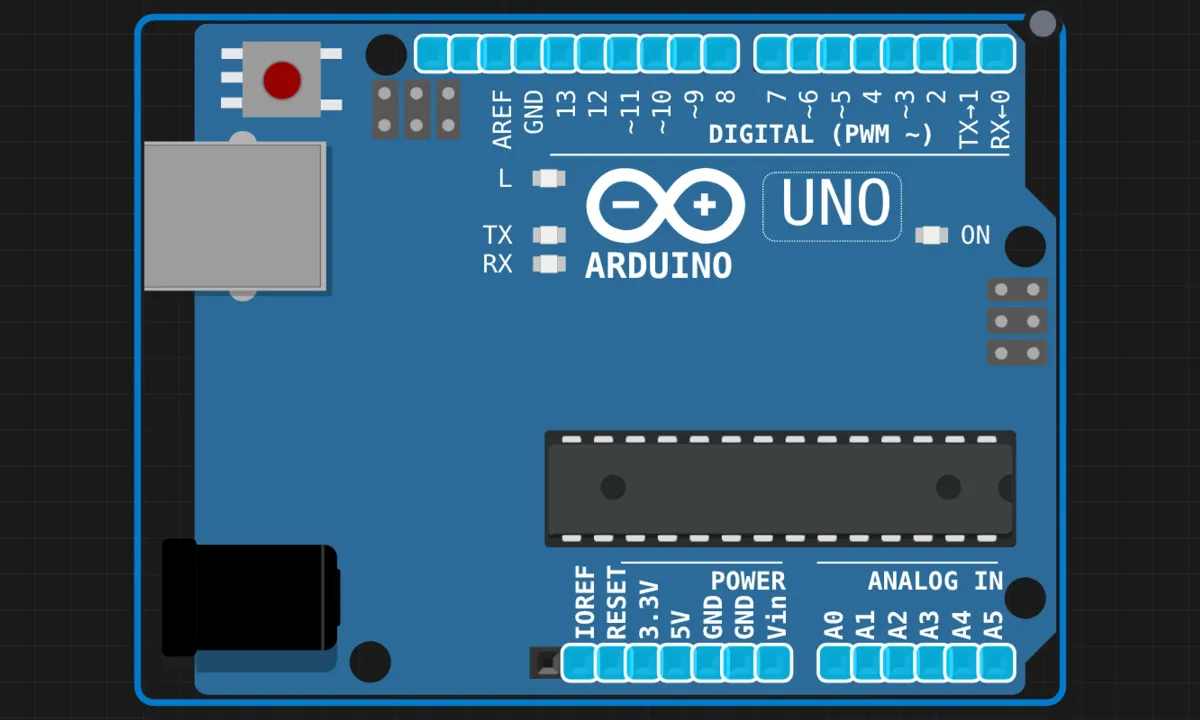
Every Arduino project so far in this series used one peripheral at a time: the serial monitor, an I2C bus, an SPI transfer. Real sketches don’t work that way. A data logger talks to its sensors over I2C, stores to an SD card over SPI, and narrates the whole thing over serial — in one boot. This example is that drill on an Uno: one sketch that scans the I2C bus, writes and verifies two bytes in an EEPROM, pushes three bytes through SPI, then settles into printing the time every two seconds.
And because this is the capstone of the Uno half of the series, it comes with a twist I’ll spoil up front: this version reads the RTC correctly, and the fancier Pico port of this same demo gets it wrong. More on that below — it’s the best bug story in the series.
The circuit
There isn’t one. That’s the point: the Uno sits alone on the canvas.
Everything the sketch touches is either inside the ATmega328P or provided by the simulator:
- Serial (UART) — pins 0 (RX) and 1 (TX), wired to the USB bridge on a real board, to the serial monitor in the sim
- I2C — A4 (SDA) and A5 (SCL); the simulator attaches a virtual 24Cxx EEPROM at 0x50 to this bus
- SPI — pins 10 (SS), 11 (MOSI), 12 (MISO), 13 (SCK); no slave wired, the sim echoes bytes internally
- DS1307 RTC at 0x68 — defined in the code and read every loop. Whether it’s actually on the virtual bus is a question the article dodges. Hold that thought.
On the real Uno, none of these peripherals need a single jumper to do this demo — which is exactly why it’s a good first “everything at once” sketch: the wiring can’t be your bug.
The sketch
// Arduino Uno — multi-protocol demo
// Serial (USART) + I2C (TWI) + SPI in one sketch.
// Setup: scan I2C bus, verify EEPROM, push SPI bytes.
// Loop:  print RTC time + uptime every 2 seconds.

#include <Wire.h>
#include <SPI.h>

#define DS1307_ADDR 0x68
#define EEPROM_ADDR 0x50
#define SS_PIN 10

byte bcdToDec(byte val) {
  return ((val >> 4) * 10) + (val & 0x0F);
}

void readRTC(byte &hr, byte &min, byte &sec) {
  Wire.beginTransmission(DS1307_ADDR);
  Wire.write(0x00);
  Wire.endTransmission();
  Wire.requestFrom(DS1307_ADDR, 3);
  sec = bcdToDec(Wire.read() & 0x7F);
  min = bcdToDec(Wire.read());
  hr  = bcdToDec(Wire.read() & 0x3F);
}

void writeEEPROM(byte reg, byte value) {
  Wire.beginTransmission(EEPROM_ADDR);
  Wire.write(reg);
  Wire.write(value);
  Wire.endTransmission();
  delay(5);   // let the write cycle finish
}

byte readEEPROM(byte reg) {
  Wire.beginTransmission(EEPROM_ADDR);
  Wire.write(reg);
  Wire.endTransmission();
  Wire.requestFrom(EEPROM_ADDR, 1);
  return Wire.available() ? Wire.read() : 0xFF;
}

byte spiTransfer(byte data) {
  digitalWrite(SS_PIN, LOW);
  byte result = SPI.transfer(data);
  digitalWrite(SS_PIN, HIGH);
  return result;
}

void setup() {
  Serial.begin(9600);
  Wire.begin();
  pinMode(SS_PIN, OUTPUT);
  digitalWrite(SS_PIN, HIGH);   // SS idles high — see notes
  SPI.begin();

  Serial.println("===================================");
  Serial.println(" Multi-Protocol Demo");
  Serial.println(" Serial (USART) + I2C (TWI) + SPI");
  Serial.println("===================================");
  Serial.println();

  // ── I2C: scan the bus ──
  Serial.println("[I2C] Scanning bus...");
  int found = 0;
  for (byte addr = 1; addr < 127; addr++) {
    Wire.beginTransmission(addr);
    if (Wire.endTransmission() == 0) {
      Serial.print("  Found device at 0x");
      if (addr < 16) Serial.print("0");
      Serial.println(addr, HEX);
      found++;
    }
  }
  Serial.print("  ");
  Serial.print(found);
  Serial.println(" device(s) on I2C bus.");
  Serial.println();

  // ── I2C: EEPROM write/read-back ──
  Serial.println("[I2C] EEPROM write/read test:");
  writeEEPROM(0, 42);
  writeEEPROM(1, 99);
  byte v0 = readEEPROM(0);
  byte v1 = readEEPROM(1);
  Serial.print("  Wrote 42, read ");
  Serial.print(v0);
  Serial.println(v0 == 42 ? " [OK]" : " [FAIL]");
  Serial.print("  Wrote 99, read ");
  Serial.print(v1);
  Serial.println(v1 == 99 ? " [OK]" : " [FAIL]");
  Serial.println();

  // ── SPI: transfer test ──
  Serial.println("[SPI] Transfer test:");
  byte spiData[] = {0xAA, 0x55, 0x42};
  for (int i = 0; i < 3; i++) {
    byte rx = spiTransfer(spiData[i]);
    Serial.print("  TX=0x");
    if (spiData[i] < 16) Serial.print("0");
    Serial.print(spiData[i], HEX);
    Serial.print(" RX=0x");
    if (rx < 16) Serial.print("0");
    Serial.println(rx, HEX);
  }
  Serial.println();

  Serial.println("Setup complete. Reading RTC...");
  Serial.println();
}

void loop() {
  byte hr, min, sec;
  readRTC(hr, min, sec);

  Serial.print("[RTC] ");
  if (hr < 10) Serial.print("0");
  Serial.print(hr);
  Serial.print(":");
  if (min < 10) Serial.print("0");
  Serial.print(min);
  Serial.print(":");
  if (sec < 10) Serial.print("0");
  Serial.print(sec);

  Serial.print("  |  Uptime: ");
  Serial.print(millis() / 1000);
  Serial.println("s");

  delay(2000);
}
Run it, set the monitor to 9600 baud (not the 115200 the rest of the series uses — this sketch is old-school), and watch: the scan reports the virtual EEPROM at 0x50, both EEPROM bytes verify OK, three SPI bytes echo, and then the RTC lines start rolling in, one every two seconds, with an uptime counter alongside.
The structure is the lesson
The individual pieces are all repeats from earlier projects — the I2C scanner, the EEPROM read/write, the SPI loopback. What’s new is the shape: everything destructive or one-shot happens in setup() (scan, write, verify), and loop() is reduced to a read-only poll. That’s the correct instinct for a bring-up sketch, and it scales all the way up to industrial power-on self-tests: probe, verify, report, then settle into steady state. If the EEPROM test fails, you find out once, at boot, in a banner you can’t miss — not forty minutes later when your logged data turns out to be 0xFF everywhere.
The helper functions earn their keep too. writeEEPROM/readEEPROM hide the awkward “write the register address, then restart” dance that every I2C register device wants. And notice readEEPROM has a guard — Wire.available() ? Wire.read() : 0xFF — so a missing EEPROM returns a recognizable failure value instead of garbage. Keep that guard in mind.
The bug story, in two parts
Part one: readRTC here is correct. Three separate Wire.read() calls, each in its own statement, each feeding bcdToDec with the right mask. Boring, unambiguous, right.
Part two: the Pico port of this same demo — same author, same structure, “upgraded” — collapses the first two of those lines into one expression: ((Wire.read() & 0x7F) >> 4) * 10 + (Wire.read() & 0x0F). Two reads in one expression. C++ won’t even guarantee which one runs first, and whichever way it goes, two bytes get consumed where one was decoded. Every register lands a position off, and because the Pico version discards the values, its output still says “RTC responded OK.” The full dissection is in the Pico multi-protocol article. The Uno version you’re reading is the before picture: proof the author knew the right pattern, and a reminder that regressions don’t announce themselves. Nobody refactors working code and expects it to get worse — and yet.
Honest notes
readRTChas no guard, and it shows. The EEPROM reader checksWire.available(); the RTC reader doesn’t. If no DS1307 answers — which is the case here, the sim attaches only the EEPROM —requestFromreturns zero bytes, everyWire.read()returns −1, and the BCD math turns that into hr=45, min=165, sec=85. The serial monitor then prints45:165:85forever, every two seconds — minutes of 165, looking for all the world like a clock that’s just very wrong. The demo never notices. Oneif (Wire.available() < 3) return;at the top ofreadRTCwould turn that silent nonsense into a detectable “RTC not found” — and the Pico port did add exactly that check. It added the guard and broke the decode. You can’t have everything.- The article claims the I2C scan “will find no devices.” It will find 0x50 — the virtual EEPROM the very next section depends on. The scanner and the EEPROM test are exercising the same simulated chip; if the scan printed zero devices, the EEPROM test would fail too. Minor prose slip, but if you run this and see “1 device(s) on I2C bus,” that’s not you doing something wrong — that’s the sim being consistent and the write-up not.
- The SPI “test” proves almost nothing. Three bytes go out, three bytes come back — but with no slave on the bus, the sim just echoes internally, and on real hardware with no MOSI-to-MISO jumper you’d read 0xFF regardless. As a smoke test for “is the SPI peripheral alive and is my code calling it correctly,” fine. As evidence that SPI works, it’s the loopback caveat from the earlier SPI article all over again: you’re testing the master against itself.
- No
SPISettings, no transactions. This sketch uses plainSPI.begin()+SPI.transfer()and accepts the defaults (4 MHz, MSBFIRST, MODE0 on the Uno). For a solo master on an empty bus, acceptable. The moment a second SPI device appears with different requirements, this style breaks — the Pico SPI article covers the transaction API that replaces it. This demo is the legacy pattern; learn from it, don’t copy it into multi-device designs. byte minis living dangerously. Arduino.h definesminas a function-like macro. Declaring a variable namedminhappens to compile — the macro only expands when followed by a parenthesis — but you’re one carelessmin(a, b)call away from a preprocessor surprise in a scope where “min” looks like your variable. Rename itminsorminuteand sleep better.- SS handling is right, though.
pinMode(SS_PIN, OUTPUT)plusdigitalWrite(SS_PIN, HIGH)beforeSPI.begin()— the article’s own pitfall section explains why: an AVR with SS floating low as an input can drop into SPI slave mode mid-conversation. This is the most-skipped line in beginner SPI code, and it’s present and correct here. Credit where due.
When it doesn’t work
- Serial monitor is empty → wrong baud. This sketch is 9600; if you just came from any other project in this series, your monitor is probably still on 115200. The symptom of a baud mismatch is gibberish, not silence — so if you see garbage characters, that’s actually good news.
- Scan finds 0 devices AND EEPROM reads FAIL → the virtual EEPROM didn’t attach; reload the example. The two failures always travel together — they’re the same chip.
- EEPROM first write OK, second FAIL → you removed the
delay(5). The write cycle is real; the sim models it; without the pause the second write lands while the chip is busy. - RTC prints 45:165:85 → that’s the missing-RTC signature described above, not a time zone problem. Add the
Wire.available()guard and print “RTC not responding” instead. - SPI RX is all 0xFF on real hardware → no loopback jumper and no slave. Expected, not broken — see the SPI loopback article for what a real test needs.
Where to go from here
The natural extensions write themselves, and the article suggests the right ones: a serial command interface (send “read 0” → get EEPROM byte 0) turns this from a demo into a tool — you already have command-parsing practice from the serial LED control project. Logging sensor readings into the EEPROM and surviving a reset makes it a data-logger embryo. And when you add a second SPI device, come back and fix the two honest gaps above first: transaction-style SPI calls, and an RTC read that can admit failure. Both fixes are five lines; both are the difference between a demo and a starting point.
Open the simulator and load the multi-protocol example. Watch the scan find 0x50, the EEPROM verify, the SPI bytes echo — then read the RTC lines knowing they’re 45:165:85 forever, and fix readRTC so it can say so. That five-line fix is the moment this stops being a tour and starts being your code.