
Blog
Pico I2C EEPROM: Write 0xDEADBEEF, Read It Back, Prove It

RAM forgets. Every variable your Pico is happily juggling right now evaporates the moment the USB cable comes out, which is fine until you need a calibration value, a user setting, or a boot count that actually counts. The answer on the I2C bus is an EEPROM — a few kilobytes of “still there in the morning” for twenty cents.
This is the same write-read-verify exercise we ran on the Arduino Uno, ported to the Pico: a virtual EEPROM at address 0x50, eight famous bytes in, eight bytes back out, every one checked. The protocol is identical; the Pico bits around the edges are what you’re here for.
The circuit
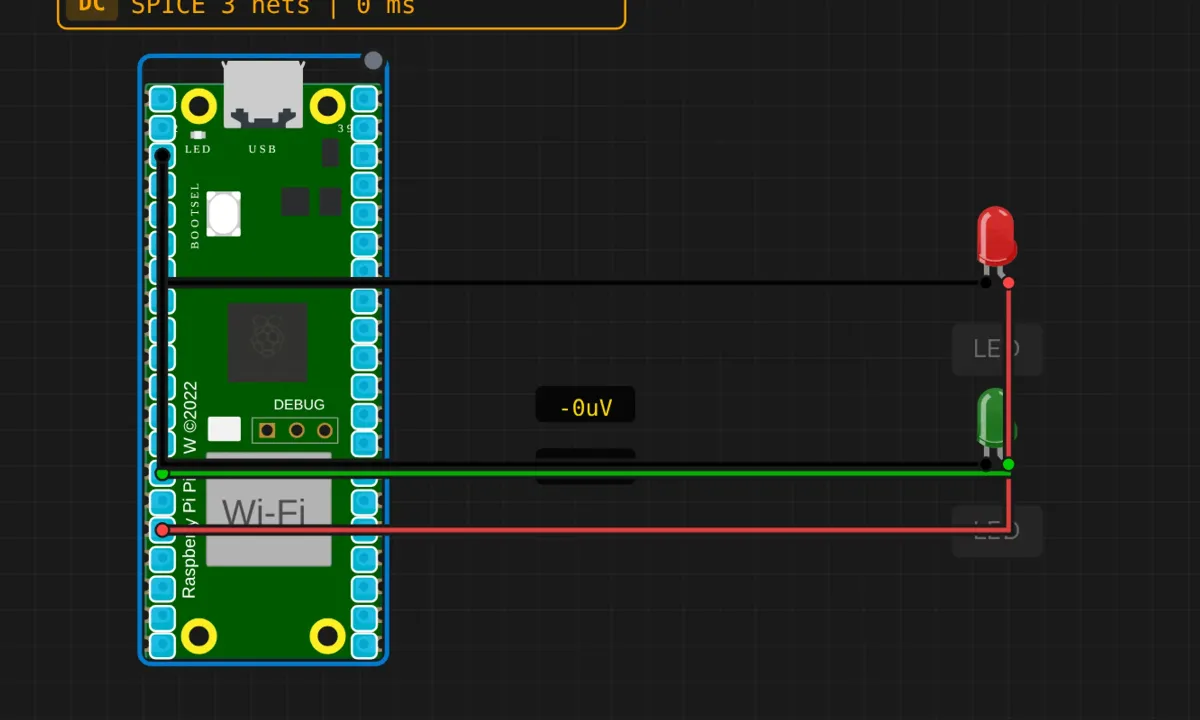
- GP12 → red LED anode; cathode → GND — labeled “write” indicator
- GP10 → green LED anode; cathode → GND — labeled “read” indicator
- The EEPROM itself is virtual: the simulator hangs it on the I2C bus (SDA=GP4, SCL=GP5) at 0x50
On real hardware this is a four-wire AT24Cxx module — SDA, SCL, 3.3V, GND — and the code below wouldn’t change. Mind the voltage: the Pico has no 5V tolerance, so a 5V-powered EEPROM module needs level shifting on the bus lines.
The sketch
// Raspberry Pi Pico — I2C EEPROM write/read/verify
// Virtual EEPROM at 0x50. Test runs once, in setup().

#include <Wire.h>

#define EEPROM_ADDR 0x50

void eepromWrite(byte memAddr, byte data) {
  Wire.beginTransmission(EEPROM_ADDR);
  Wire.write(memAddr);   // which cell
  Wire.write(data);      // what to store
  Wire.endTransmission();
  delay(5);              // real chips need a few ms to commit the write
}

byte eepromRead(byte memAddr) {
  // dummy write: set the address pointer, send no data
  Wire.beginTransmission(EEPROM_ADDR);
  Wire.write(memAddr);
  Wire.endTransmission();

  Wire.requestFrom(EEPROM_ADDR, 1);
  return Wire.available() ? Wire.read() : 0xFF;  // 0xFF = bus went silent
}

void setup() {
  Serial.begin(115200);
  delay(500);
  Wire.begin();
  Serial.println("=== Pico I2C EEPROM Test ===");
  Serial.println();

  // the two most famous magic numbers in computing, split into bytes
  byte testData[] = {0xDE, 0xAD, 0xBE, 0xEF, 0xCA, 0xFE, 0xBA, 0xBE};

  Serial.println("Writing 8 bytes...");
  for (int i = 0; i < 8; i++) {
    eepromWrite(i, testData[i]);
    Serial.print("  ["); Serial.print(i);
    Serial.print("] = 0x");
    if (testData[i] < 16) Serial.print('0');
    Serial.println(testData[i], HEX);
  }
  Serial.println();

  Serial.println("Reading back...");
  int pass = 0;
  for (int i = 0; i < 8; i++) {
    byte val = eepromRead(i);
    Serial.print("  ["); Serial.print(i);
    Serial.print("] = 0x");
    if (val < 16) Serial.print('0');
    Serial.print(val, HEX);
    if (val == testData[i]) {
      Serial.println(" OK");
      pass++;
    } else {
      Serial.print(" FAIL (expected 0x");
      Serial.print(testData[i], HEX);
      Serial.println(")");
    }
  }

  Serial.println();
  Serial.print("Result: ");
  Serial.print(pass);
  Serial.println("/8 passed");
}

void loop() {
  delay(10000);   // test already ran — keep the output on screen
}
Run it and you get sixteen lines of hex and a verdict: 8/8 passed. The test data is a small piece of computing culture — 0xDEADBEEF and 0xCAFEBABE are the two most famous magic numbers in the business (the second one literally starts Java class files). There’s a practical reason too: a memorable pattern means that when a read comes back wrong, you notice which bytes went wrong, instead of squinting at random noise.
The three moves that matter
- Write needs recovery time. EEPROM cells take a few milliseconds to physically commit after
endTransmission(). Thedelay(5)is the datasheet’s number for the AT24C series, not superstition. The simulator’s virtual chip is forgiving; real silicon silently drops writes that arrive too fast. - Read starts with a fake write. You “write” the cell number first (that’s setting the chip’s internal address pointer), then
requestFrom()pulls the byte back out. Same register-pointer dance as the RTC project, one byte instead of seven. - The test lives in
setup()on purpose. A storage smoke test should run once per reset and then get out of the way. The emptyloop()isn’t laziness — it’s correct design for a self-test. Every storage chip you bring up in your career deserves this exact ceremony before you trust it with data that matters.
Honest notes
- The indicator LEDs strike out again. Third Pico example in a row: the circuit wires “write” and “read” LEDs, the prose describes them blinking, and the sketch contains not one
pinModeordigitalWritefor either. They’re decoration. If you want them real: pin 12 HIGH around the write call, pin 10 HIGH around the read, LOW after — and at that point you’ve reinvented the logic analyzer, poorly, which is still a fine exercise. 0xFFis still a lying sentinel. A silent bus returns 0xFF — which is also the natural state of an erased EEPROM cell. “Read failed” and “cell was never written” are indistinguishable here. For a demo, acceptable; for firmware that matters, return a status and a value separately.- The chip wears out, slowly but surely. ~100,000 write cycles per cell on real AT24C silicon. Writing a counter once a second burns that in about a day. This sketch writes eight cells once — the correct relationship with EEPROM. High-frequency state wants FRAM or flash with wear leveling.
- Byte-at-a-time is the slow lane. Real chips take page writes (up to 32 bytes per transaction). Eight bytes doesn’t justify the complexity; a data logger writing hundreds of bytes per minute absolutely does.
- The address isn’t guaranteed to be 0x50. A0–A2 pins on the physical chip shift the address — up to eight EEPROMs per bus, or one nasty collision if left floating. When a real chip won’t answer, those three pins are suspect number one. (The Pico scanner from the earlier project is how you check.)
When it fails
- All 8 reads come back 0xFF, all FAIL → nothing on the bus at 0x50. In the sim: reload the example so the virtual EEPROM attaches. On hardware: address jumpers, wiring, pull-ups — and this is what the I2C scanner exists for.
- Intermittent FAILs on real hardware → write delay too short for your chip. Try 10 ms. Cheap clones sometimes need longer than the datasheet admits.
- First read fails, rest pass → marginal timing: the chip was still committing the last write when the first read arrived. Same fix.
- Output stops after the banner → compile succeeded but the write loop crashed? No — more likely the sim wasn’t actually running. It happens to everyone weekly.
Where to go from here
The upgrade that turns this from demo to feature: store a struct. Serialize a settings object — brightness, volume, last mode — into bytes 0–15 with a checksum at the end; on boot, read back and verify the checksum before trusting anything. Bytes + offset + checksum is the skeleton of every “remember my settings” feature in existence. Strings are the same trick with a length byte in front.
Open the simulator and load the Pico EEPROM example. Watch 0xDEADBEEF and 0xCAFEBABE go in and come back verified — then change one expected value in the compare loop to something wrong and run again. A test that can fail is the only kind worth having, and watching it catch your own sabotage is the lesson that sticks.