
Blog
Pico SPI Loopback Test: Five Bytes, and a Pin Map That Fights Back

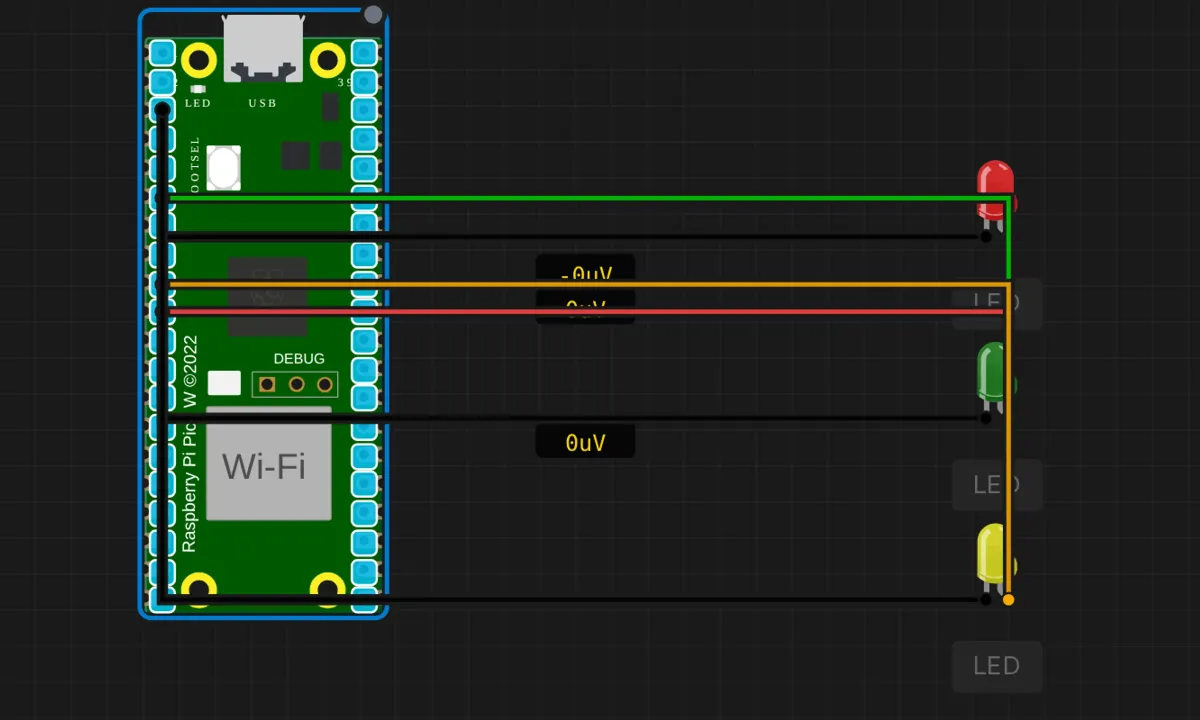
We ran the SPI loopback on the Arduino Uno already — send a byte, get it back, compare. This is the Pico port, and it comes with a genuine mystery baked in: the circuit wires the bus to one set of pins, the code announces a completely different set, and the source article admits the contradiction only in its troubleshooting section. We’ll untangle it, because “which pins is SPI actually on” is the number-one reason Pico SPI projects do nothing.
The test itself: five bytes out through SPI0, five bytes echoed back, MATCH or DIFFER in hex. No slave, no CS — the simulator loops the bytes internally.
The circuit — and the contradiction
The canvas wires three indicator LEDs onto the SPI lines:
- Red LED → MOSI line (labeled GP7 in the article’s wiring table)
- Green LED → MISO line (GP4)
- Yellow LED → SCK line (GP6)
- All cathodes → GND. No CS — there’s no slave to select.
Now open the sketch and read the banner it prints: SPI0: MISO=GP16, MOSI=GP19, SCK=GP18. GP4/6/7 on the schematic, GP16/18/19 in the code. These cannot both be true, and on a real Pico it’s the code that’s right: the standard Arduino core’s default SPI0 mapping is MISO=GP16, MOSI=GP19, SCK=GP18, CS=GP17. The GP4/6/7 wiring reflects the simulator’s own board variant, which numbers pins after the Nano RP2040 Connect style. In the sim it doesn’t matter — the echo is internal. On a breadboard it matters enormously, and this is exactly how you find out: wire per one document, run, get 0xFF for everything, then start reading pinout diagrams at midnight.
The sketch
// Raspberry Pi Pico — SPI loopback test
// Real Pico default SPI0: MISO=GP16, MOSI=GP19, SCK=GP18
// (the sim's board wires the indicator LEDs to GP4/6/7 instead)

#include <SPI.h>

void setup() {
  Serial.begin(115200);
  delay(500);
  Serial.println("=== Pico SPI Loopback Test ===");
  Serial.println("SPI0: MISO=GP16, MOSI=GP19, SCK=GP18");
  Serial.println();

  SPI.begin();
  SPI.beginTransaction(SPISettings(1000000, MSBFIRST, SPI_MODE0));
  // 1 MHz, most-significant-bit first, mode 0

  byte testBytes[] = {0x55, 0xAA, 0xFF, 0x00, 0x42};
  int count = sizeof(testBytes);

  Serial.println("Sending bytes and reading loopback:");
  for (int i = 0; i < count; i++) {
    byte rxByte = SPI.transfer(testBytes[i]);
    Serial.print("  TX: 0x");
    if (testBytes[i] < 16) Serial.print('0');
    Serial.print(testBytes[i], HEX);
    Serial.print("  RX: 0x");
    if (rxByte < 16) Serial.print('0');
    Serial.print(rxByte, HEX);
    Serial.print("  ");
    Serial.println(rxByte == testBytes[i] ? "MATCH" : "DIFFER");
  }

  SPI.endTransaction();
  Serial.println();
  Serial.println("SPI test complete.");
}

void loop() {
  delay(10000);   // test ran once in setup — nothing left to do
}
Run it and you get five MATCH lines. The byte selection isn’t random: 0x55 and 0xAA are alternating-bit patterns that exercise every data line on every clock edge, 0xFF and 0x00 cover the rails, and 0x42 is the arbitrary payload standing in for real data. Same test pattern as the Uno version, same reasoning.
What’s genuinely different on the Pico
SPISettingsinstead of clock dividers. The Uno’sSPI_CLOCK_DIV16made you compute backwards from 16 MHz. The Pico API takes the frequency you actually want —SPISettings(1000000, ...)is 1 MHz, said out loud. The RP2040’s SPI can run at tens of MHz; 1 MHz is the polite starting speed.- Transactions are explicit.
beginTransaction()latches your settings for the bus segment,endTransaction()releases it. On the Uno you calledsetClockDividerand hoped no library changed it behind your back. The transaction API exists precisely because shared buses and interrupt-driven libraries kept clobbering each other’s settings — use it, it’s the modern habit. - Two SPI peripherals, many pin options. The RP2040 has SPI0 and SPI1, each routable to several GPIO sets. The Arduino core exposes them as
SPIandSPI1with settable pins (SPI.setRX(pin)etc. beforebegin()). Flexibility is great; it’s also how the schematic-and-code disagreement above happens. Print your pin map in the banner like this sketch does — future-you, debugging, will thank present-you.
Honest notes
- The LEDs flicker from real traffic this time, but barely. Unlike the I2C examples (where the indicator LEDs were on the wrong pins entirely), these three are wired to actual bus lines and will shimmer during the transfer. But five bytes at 1 MHz is 40 µs of activity — a blink you will not see. The LEDs are schematic garnish; the serial output is the instrument. On a live bus with sustained traffic they glow dimly, which at least tells you something is moving.
- The loopback echo is a simulator courtesy. The sim returns each byte without a jumper. On a real Pico you must physically wire MOSI (GP19) to MISO (GP16) — that’s the entire loopback. No jumper, and every read returns whatever the floating MISO line feels like, usually 0xFF.
- No CS means no evidence about CS. This test proves the shift registers work. It says nothing about chip-select handling, transaction framing, or whether a real slave would understand you — the same caveat as the Uno version. Smoke test, not interview.
- The pin contradiction is the real lesson. Two authoritative-looking documents disagreed about something checkable. The check takes ninety seconds: run the code, probe the pins, believe the oscilloscope (or the loopback result) over the prose. Keep that reflex.
When the bytes don’t come back
- RX is all 0xFF (real hardware) → no MOSI-to-MISO jumper, or it’s on the wrong pins. GP19 → GP16 for the default mapping.
- RX is all 0x00 (real hardware) → MISO shorted to ground, or the jumper landed on a GND pin. Check the pinout diagram, then check which way the board was rotated. Everyone’s done it.
- Bytes shifted by one bit → wrong SPI mode.
SPI_MODE0samples on the leading edge; a part expecting MODE1 reads everything one clock late. Try the modes before rewiring. - Works at 1 MHz, garbage at 8 MHz → wires too long or sloppy. SPI has no ACK — the master never learns the byte was missed, so speed problems look like data problems.
- Serial says nothing at all → sim not running / monitor not open. The classics.
Where to go from here
The next step is a real slave: any SPI sensor or display, wired to GP16–19 with a CS pin you control, started at 1 MHz and only then cranked up. The multi-protocol Pico project combines SPI with I2C and UART on one board, which is where transaction discipline stops being optional. And the loopback habit itself transfers everywhere: new board, new bus, send known bytes first, read the datasheet second.
Open the simulator and load the Pico SPI loopback example. Watch the five MATCH lines, then read the pin banner and look at where the LEDs are actually wired — finding that contradiction yourself, in a safe sandbox, is cheaper than finding it on a PCB. That’s the whole point of practicing in a simulator.