
Blog
ESP32 Blink LED: Two LEDs, One Strapping Pin, Zero Hardware

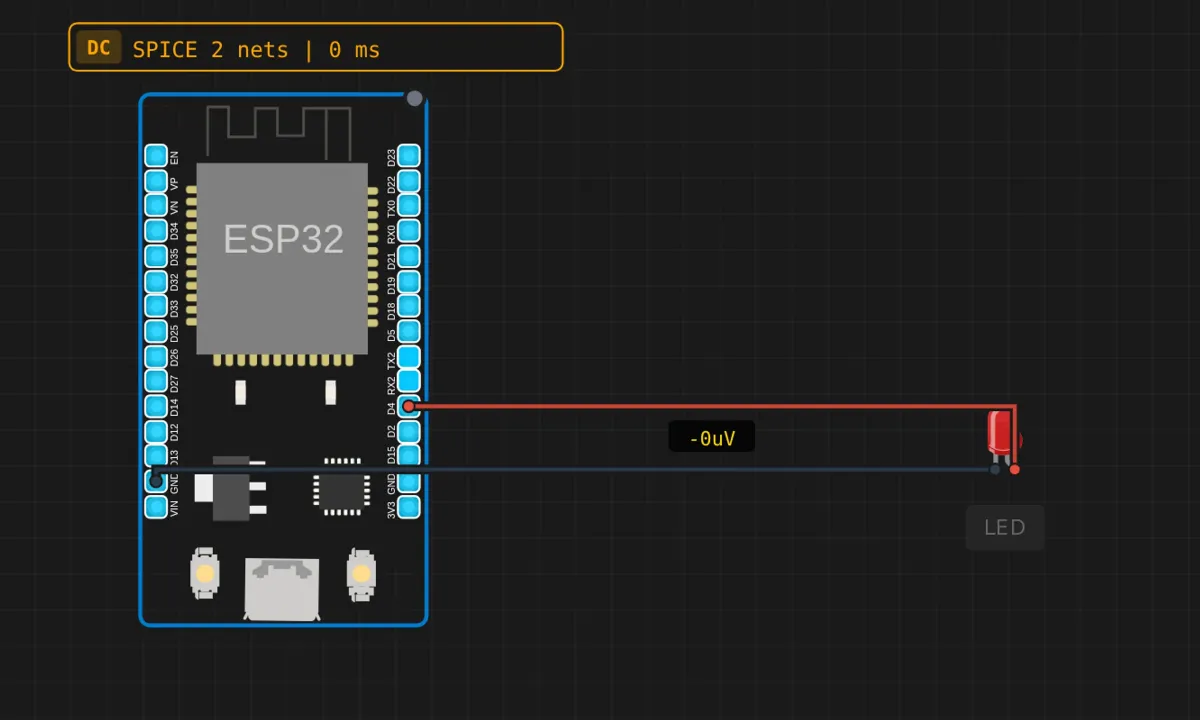
This is the third blink in this series — after the Uno and the Pico, you know the drill. So instead of re-explaining what digitalWrite does, let’s spend the word count on what’s actually different when the board is an ESP32: two LEDs (one onboard, one wired), 3.3V logic, a pin that doubles as a boot-mode selector, and a chip that could be streaming video over Wi-Fi while it blinks.
The project: blink the onboard blue LED on GPIO2 and an external red LED on GPIO4, in sync, in the browser simulator. No hardware, no USB cable, no driver wrestling.
The circuit
- GPIO4 → red LED anode — red wire
- LED cathode → GND — dark wire
- The onboard blue LED on GPIO2 needs nothing — it’s on the board
Sharp-eyed readers already noticed: no resistor in series with the external LED. The simulator’s LED component models enough internal resistance to forgive this. A real ESP32 pin sourcing into a bare LED will exceed its comfortable ~12 mA and the LED’s own rating in short order — on a breadboard, put 220 Ω–330 Ω in series. The sim’s forgiveness is a feature for learning logic and a bug for learning hardware habits. Both things are true; keep the resistor habit anyway.
The sketch
// ESP32 — blink two LEDs
// Onboard blue LED on GPIO2, external red LED on GPIO4

#define LED_BUILTIN_PIN 2   // onboard blue LED (most DevKit boards)
#define LED_EXT_PIN     4   // the one we just wired

void setup() {
  Serial.begin(115200);
  pinMode(LED_BUILTIN_PIN, OUTPUT);
  pinMode(LED_EXT_PIN, OUTPUT);
  Serial.println("ESP32 Blink ready!");
}

void loop() {
  digitalWrite(LED_BUILTIN_PIN, HIGH);
  digitalWrite(LED_EXT_PIN, HIGH);
  Serial.println("LED ON");
  delay(500);

  digitalWrite(LED_BUILTIN_PIN, LOW);
  digitalWrite(LED_EXT_PIN, LOW);
  Serial.println("LED OFF");
  delay(500);
}
Run it: both LEDs pulse together, once per second, and the serial monitor alternates ON/OFF at 115200 baud. Two small things worth noticing in the code itself. First, the pins are named constants, not raw numbers scattered through the calls — one-line change, applied everywhere. Second, there’s no LED_BUILTIN shortcut: on ESP32 boards that constant isn’t reliably defined, so defining your own is the norm. Different ecosystem, different habit.
What the ESP32 changes under you
- GPIO2 is a strapping pin. On the classic ESP32, the level on GPIO2 at reset helps decide the boot mode. An LED hanging on it is normally harmless (it’s a light pull), but this is why some boards refuse to boot when you attach certain things to pins 0, 2, 5, 12, or 15 — they’re all sampled at reset. If an ESP32 project ever “won’t flash” or “boots weird” only when your circuit is connected, a strapping pin is the first suspect.
- “The onboard LED is on GPIO2” is a convention, not a law. Most ESP32 DevKit clones put it there; some boards use GPIO5, some GPIO22, some have none. On real hardware, check your board’s silkscreen or schematic before assuming. In the sim, it’s GPIO2, full stop.
- 3.3V logic, like the Pico. No 5V tolerance. The external LED runs a bit dimmer than it would on a 5V Uno with the same resistor — normal.
- There’s a lot of silicon doing nothing right now. Dual cores at 240 MHz, Wi-Fi, Bluetooth, half a megabyte of RAM — all idling so an LED can blink. That’s fine; every ESP32 project on earth starts here. But it means the ESP32’s failure modes are different: a watchdog timer, an RTOS under your code, and a flash chip that boots through a bootloader. When things misbehave on real hardware, the error messages are longer and stranger than an Uno’s. You get used to it.
delay()still blocks — sort of. On ESP32 Arduino, your sketch runs as an RTOS task, anddelay()yields to other tasks rather than spinning. Your LED still can’t do anything during the pause, and themillis()pattern from the Pico serial echo project is still the right answer the moment you add a second job. The RTOS safety net doesn’t make blocking delays good style; it just makes them less catastrophic.
When it doesn’t blink
- Neither LED blinks → sim not running (Run button), or the compile failed — read the error badge first, always.
- External LED dark, onboard blinking → wiring: anode toward GPIO4, cathode toward GND. LEDs are one-way devices; fifty-fifty odds, wrong half the time.
- Nothing on the serial monitor → monitor not open or wrong baud. The sketch says 115200; match it.
- Works in the sim, dead on your real DevKit → check the onboard LED’s actual pin on your board revision, and check whether anything you attached is fighting a strapping pin at boot.
Where to go from here
The extensions are the usual ladder, with an ESP32 twist at the top: vary the delays, blink the two LEDs in alternation instead of sync, then fade instead of blink — analogWrite() works on most ESP32 pins in current cores (older cores make you call ledcSetup() first, which is the ESP32’s PWM machinery leaking through the Arduino abstraction). Then the ESP32-specific part no other board in this series can follow: turn the LED into a tiny web toggle. The board already has Wi-Fi; “blink” becomes “serve a page with a button.” That’s a bigger tutorial, and it’s the reason people pick this chip.
Open the simulator and load the ESP32 blink example. Watch both LEDs sync up, then try the alternation edit — two lines changed, and the demo already looks like a machine with intent. On to the fade after that.