
Blog
Arduino I2C Scanner: Find Every Device on the Bus

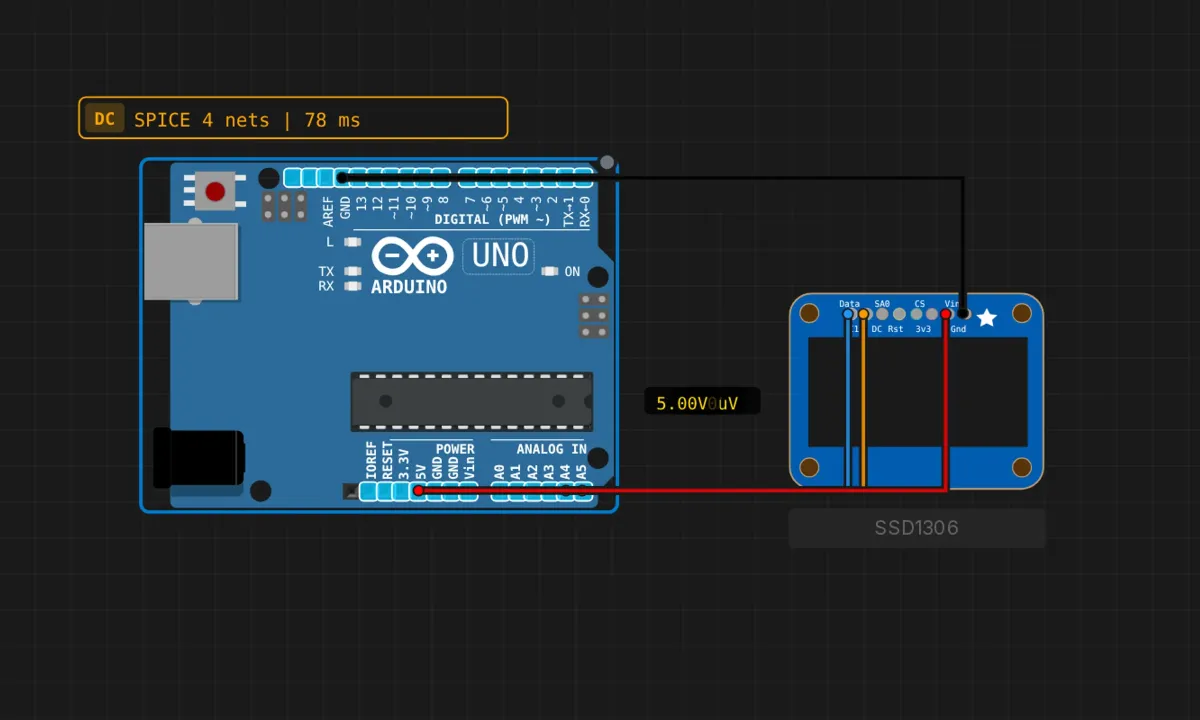
Every I2C device on the bus answers to a 7-bit address, and half the time that address is a rumor. The datasheet says one thing, the seller’s listing says another, and the solder jumpers on the back of the board say a third. Before you debug a driver library, you want one answer: is the thing even on the bus?
That’s what an I2C scanner does — it knocks on all 126 possible doors and reports which ones answer. It’s the single most useful diagnostic sketch in embedded work, it takes four wires to demo, and it runs in the browser simulator with an SSD1306 OLED playing the role of “known device at 0x3C.”
Four wires, two of them data
I2C needs exactly two signal lines, shared by every device on the bus:
- A4 (SDA) → OLED DATA pin (blue wire) — the data line
- A5 (SCL) → OLED CLK pin (orange) — the clock line
- 5V → VIN (red) and GND → GND (black) — power
On the Uno, A4/A5 are the I2C pins — they’re analog inputs that double as the TWI hardware. Other boards put SDA/SCL elsewhere, which is a common source of “it worked on my Uno” confusion. The bus is open-drain: devices can only pull the lines low, and pull-up resistors (usually 4.7kΩ, usually already on the breakout board) pull them back high. The simulator models the OLED’s onboard pull-ups for you; on a bare-chip build, forgetting pull-ups means a dead bus with no error message.
The sketch
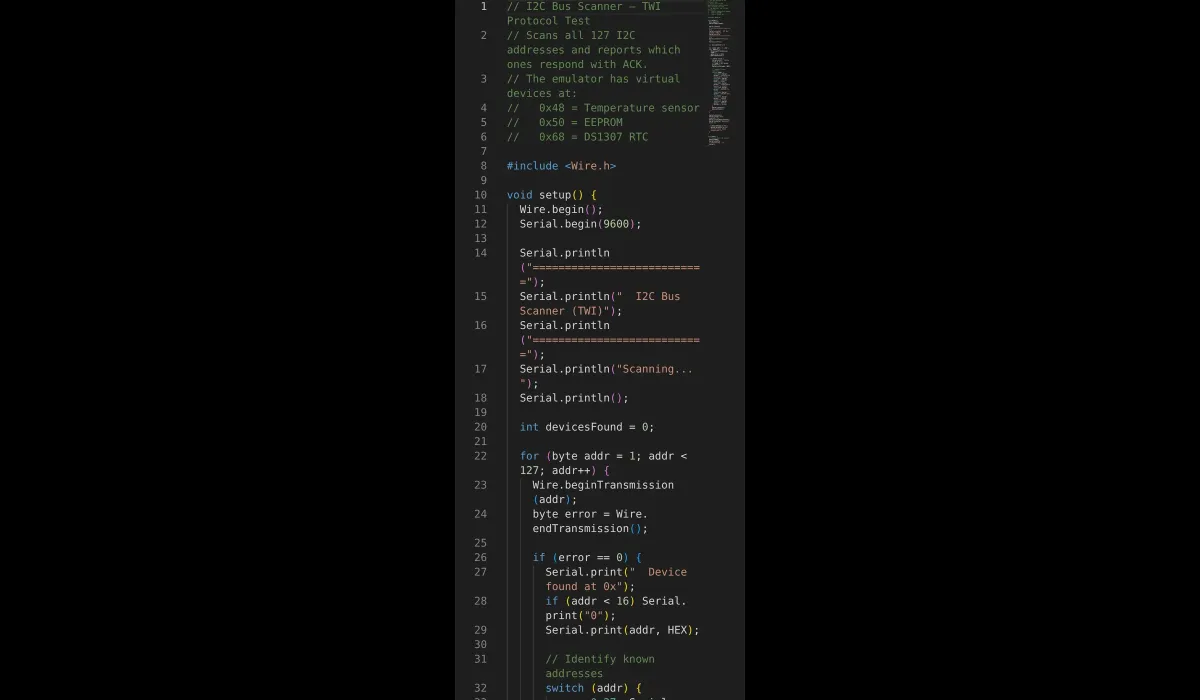
// I2C bus scanner
// Knocks on addresses 1-126, reports which ones ACK

#include <Wire.h>

void setup() {
  Wire.begin();
  Serial.begin(9600);

  Serial.println("===========================");
  Serial.println("  I2C Bus Scanner (TWI)");
  Serial.println("===========================");
  Serial.println("Scanning...");
  Serial.println();

  int devicesFound = 0;

  for (byte addr = 1; addr < 127; addr++) {
    Wire.beginTransmission(addr);
    byte error = Wire.endTransmission();

    if (error == 0) {
      // ACK received — something lives here
      Serial.print("  Device found at 0x");
      if (addr < 16) Serial.print("0");
      Serial.print(addr, HEX);

      // tag the usual suspects
      switch (addr) {
        case 0x27: Serial.print("  (PCF8574 LCD backpack)"); break;
        case 0x3C: Serial.print("  (SSD1306 OLED)"); break;
        case 0x48: Serial.print("  (Temperature sensor)"); break;
        case 0x50: Serial.print("  (EEPROM)"); break;
        case 0x68: Serial.print("  (DS1307 RTC)"); break;
        case 0x76: Serial.print("  (BME280 sensor)"); break;
        case 0x77: Serial.print("  (BMP180/BMP280)"); break;
      }
      Serial.println();
      devicesFound++;
    }
  }

  Serial.println();
  Serial.print("Scan complete. ");
  Serial.print(devicesFound);
  Serial.println(" device(s) found.");

  if (devicesFound == 0) {
    Serial.println("No I2C devices found. Check connections.");
  }
}

void loop() {
  // rescan every 10 seconds in case the bus changes
  delay(10000);
  Serial.println();
  Serial.println("Rescanning...");
  setup();
}
What “found” actually means
The scan itself is two lines: Wire.beginTransmission(addr) sends a start condition plus the address byte; Wire.endTransmission() finishes and returns a status code. Return code 0 means the device pulled SDA low during the ninth clock pulse — an ACK, the hardware equivalent of a nod. Anything else means silence.
Worth knowing: the scanner detects presence, not health. A device can ACK its address and still be misconfigured, half-dead, or the wrong chip entirely. The address table in the switch is a convenience, not a guarantee — plenty of sensors let you move between two addresses with a jumper, and clones sometimes ship at whatever address the factory felt like that week. Trust the ACK, not the label.
Run it
Press Run, open the serial monitor, and within a second you should see Device found at 0x3C (SSD1306 OLED) — the display on the canvas answering the roll call. Every 10 seconds it rescans. The OLED stays dark through all of this: we never drive it, just interrogate it. That’s the point — the scanner doesn’t need a display driver to see the display.
Honest notes
- Calling
setup()fromloop()is a shortcut, not a pattern. It re-runsWire.begin()andSerial.begin()every cycle, which is harmless here and sloppy anywhere else. In your own code, wrap the scan in its own function. - The scanner can hang on a sick bus. If SDA is shorted to ground on real hardware, some Wire library versions block forever inside
endTransmission(). If your real board freezes mid-scan, that’s why — check for shorts before blaming the code. - Address conflicts don’t announce themselves. Two devices at the same address both ACK, the scanner shows one entry, and then neither device works when you actually talk to it. If a bus behaves strangely with a clean scan, start unplugging things.
- Default speed is 100kHz.
Wire.setClock(400000)switches to fast mode afterWire.begin()— most modern devices handle it, some old ones don’t. The scanner doesn’t care about speed; the ACK works either way.
When the scan finds nothing
- Zero devices → SDA/SCL swapped (they’re next to each other, it happens constantly), power missing, or — on real hardware — no pull-ups anywhere on the bus.
- Found at an unexpected address → check the solder jumpers on the module. 0x3C vs 0x3D for OLEDs, 0x76 vs 0x77 for BME/BMP sensors — one blob of solder apart.
- Serial monitor is silent → sim not running, monitor not open, or the compile failed and you didn’t notice the error badge.
- Real board, found but flaky → long wires. I2C was designed for centimeters on a PCB, not meter-long jumper looms. Keep leads short or slow the clock down.
Make it more useful
The obvious upgrade: show results on the OLED itself instead of the serial monitor — the Adafruit SSD1306 + GFX libraries from the TFT project work here, and “scanner that reports on its own display” is a genuinely handy bench tool. A pushbutton to trigger scans beats the 10-second timer. And once you trust the bus, the natural next step is reading an actual register: the RTC and EEPROM projects pick up exactly where this one stops.
Open the simulator and load the I2C scanner example — the OLED’s already on the bus at 0x3C, waiting to be found. Then delete a wire and run it again. Watching the scan go from one device to zero teaches you the failure mode better than any diagram.