
Blog
Pico ADC Read: Two Pots, One Floating Pin, and the Chip’s Own Thermometer

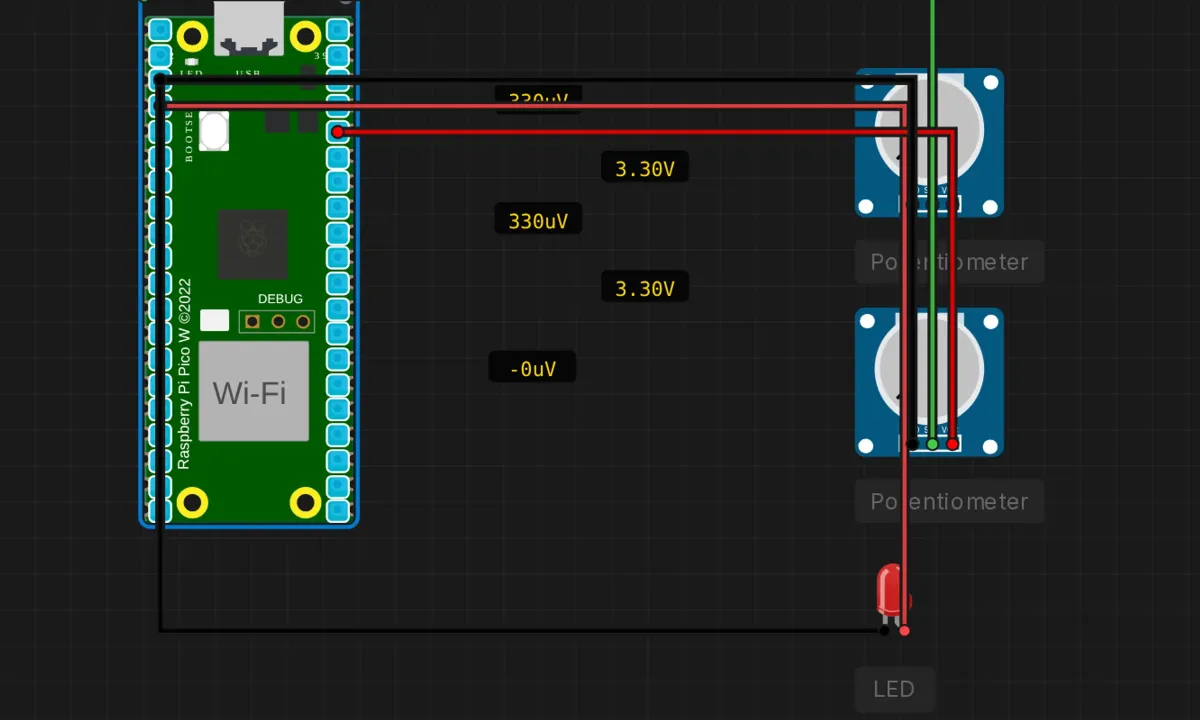
Everything so far in this series has been digital: pins are HIGH or LOW, bytes match or don’t. The real world isn’t like that — light, temperature, position, pressure all arrive as voltage, continuously variable. The Pico’s ADC (analog-to-digital converter) is the bridge: it turns a voltage on a pin into a number from 0 to 4095.
This project reads three analog channels plus the RP2040’s built-in temperature sensor, once per second. Two of the channels have potentiometers attached. The third has nothing attached at all, and what it prints is its own lesson.
The circuit
- Potentiometer 1 → wiper (SIG) to GP26 (A0); the other two legs to 3.3V and GND
- Potentiometer 2 → wiper to GP27 (A1); same 3.3V / GND rails
- Red LED → anode to GP2, cathode → GND (wired, labeled — and, per series tradition, never driven by the code)
- GP28 (A2) → nothing. Remember that.
Each potentiometer is a voltage divider: the wiper picks off a fraction of the 3.3V across the resistive track, so turning the knob sweeps the pin from 0V to 3.3V. That full sweep becomes 0 to 4095 in code. One hard rule before we go further: the Pico’s ADC pins accept up to 3.3V, maximum — not 5V, ever. Five volts into an ADC pin is how you learn about the RP2040’s replacement cost.
The sketch
// Raspberry Pi Pico — ADC read test
// A0=GP26, A1=GP27, A2=GP28, internal temp sensor via A3
// 12-bit resolution: 0-4095 across 0-3.3V

void setup() {
  Serial.begin(115200);
  delay(500);
  Serial.println("=== Pico ADC Read ===");
  Serial.println("A0=GP26  A1=GP27  A2=GP28  Temp=internal");
  Serial.println("12-bit resolution (0-4095), 3.3V ref");
  Serial.println();

  analogReadResolution(12);
}

void loop() {
  int a0 = analogRead(A0);
  int a1 = analogRead(A1);
  int a2 = analogRead(A2);   // nothing connected — watch what this prints

  // internal temperature sensor (ADC channel 4, exposed as A3)
  int tempRaw = analogRead(A3);
  float voltage = tempRaw * 3.3f / 4095.0f;
  float tempC = 27.0f - (voltage - 0.706f) / 0.001721f;

  Serial.print("A0: "); Serial.print(a0);
  Serial.print("  A1: "); Serial.print(a1);
  Serial.print("  A2: "); Serial.print(a2);
  Serial.print("  Temp: "); Serial.print(tempC, 1); Serial.println(" C");

  delay(1000);
}
Run it, open the serial monitor, then turn the potentiometer knobs in the sim: A0 and A1 track the knobs from 0 to 4095. The temperature column prints something in the mid-20s. And A2 — the pin with nothing on it — prints whatever it feels like. Watch it for a while. That’s not a bug in your code; that’s what a floating analog input is.
The details worth keeping
- Pin mapping: A0=GP26, A1=GP27, A2=GP28, and A3 is a fiction. There is no GP29-ish pin behind A3 in this core —
analogRead(A3)is mapped to the internal temperature sensor (ADC channel 4), which has no external pin at all. Three real analog pins, one internal sensor, four labels. - 12 bits, but don’t believe all of them. 0–4095 nominal, ~0.8 mV per step. The RP2040’s ADC is, however, famous in the wrong way — a known silicon erratum gives it lumpy linearity, and the last few bits wobble with noise. Treat it as a solid 9–10 useful bits. If you need steadier numbers, average 8–16 reads; if you need accurate ones, that’s a different ADC chip entirely.
- The temperature formula is two constants and a subtraction.
T = 27 − (V − 0.706) / 0.001721: 0.706V is the sensor’s output at 27 °C, 1.721 mV/°C is the slope. It measures the die temperature, not your room — a working chip runs warmer than ambient, and per-chip offsets are ±several degrees uncalibrated. Great for “is my board overheating,” useless for a weather station. analogReadResolution(12)is already the default. Setting it explicitly is still right: code that depends on defaults breaks quietly when someone changes the default. One line of insurance.
Honest notes
- The floating A2 column is the best part of this demo. An unconnected analog input has no defined voltage — it drifts with noise, nearby signals, humidity, phase of the moon. Beginners regularly wire a sensor, get sane numbers, then “simplify” the wiring, disconnect the wiper, and chase the random output for an hour. You just saw the phenomenon on purpose, in a safe place. If a channel must sit idle, tie it to GND.
- The LED is decorative — fourth example running. Wired to GP2, labeled in the circuit, and driven by exactly zero lines of code. At this point in the Pico series it’s a tradition. One
pinMode(2, OUTPUT)and a threshold check —digitalWrite(2, a0 > 2048 ? HIGH : LOW)— turns it into a “pot past halfway” indicator and breaks the streak. - The simulator’s potentiometers are perfectly clean. Real pots crackle — the wiper bounces, the track wears, and the last 5% of travel gets scratchy. Real analog readings jitter by a few counts even with a perfect pot. If your real project needs a stable display, you’ll average or hysteresis the value; the sim never forces you to learn that, so learn it on purpose.
- 3.3V reference means supply noise is measurement noise. The ADC compares against the 3.3V rail. On USB power that rail wobbles with whatever your computer’s port is doing. For potentiometers it cancels out (they’re ratiometric — they divide the same rail you measure against). For absolute-voltage sensors, it doesn’t. Worth knowing before you trust the third digit.
When the numbers misbehave
- A channel reads garbage regardless of knob position → wiper not connected. A floating pin looks exactly like this — which is why A2 is in the demo.
- Readings stuck at 0 or 4095 → pot wired as a variable resistor (one outer leg + wiper) instead of a divider (both outer legs). You need the full 3.3V-to-GND span across the track.
- Temperature reads 60 °C+ on an idle board → check the math order:
tempRaw * 3.3f / 4095.0f— integer division or a missed float anywhere in that chain silently truncates. - Values jitter ±20 counts on real hardware → normal. Average sixteen samples and the jitter shrinks by four; the erratum lumps remain, and now you know they’re silicon, not your code.
Where to go from here
The obvious upgrade closes the loop: LED on GP2 as a threshold indicator, or map A0 straight to a PWM pin and dim an LED with the knob — analog in, analog-ish out, twenty lines total. Two pots make a joystick; add the temp sensor as a third channel and you have the beginnings of an environmental logger (pair it with the EEPROM project for persistence). And when you outgrow the on-chip ADC’s accuracy — you will, on a precision project — an external ADS1115 on I2C is the standard escape hatch, and you already know the bus.
Open the simulator and load the Pico ADC example. Turn both knobs, watch A0 and A1 track — then spend a minute just watching A2 wander with nothing attached. Understanding why a disconnected pin lies to you is worth more than the two channels that work.