
Blog
Arduino Simon Says: Build the Memory Game with 4 LEDs and 4 Buttons

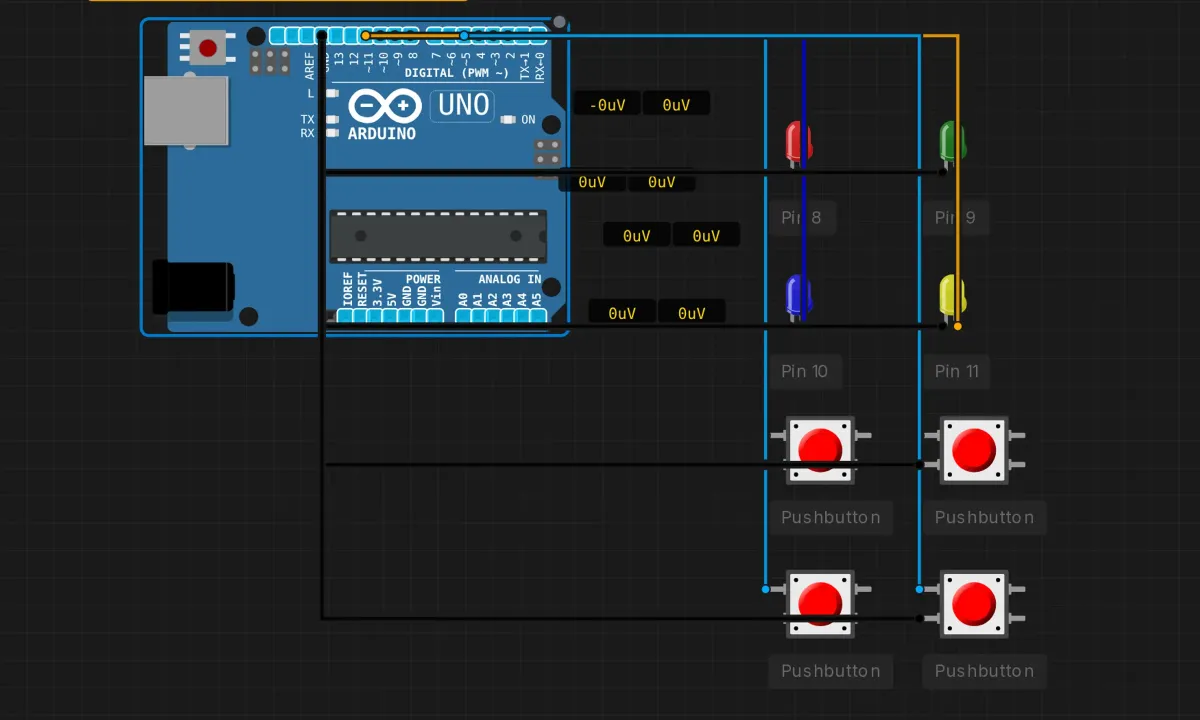
Simon Says is the 1978 memory game: the machine flashes a pattern of colored lights, you repeat it back by pressing buttons, and each round the pattern gets one step longer. Building it on Arduino is a rite of passage because it’s the first project where the code has to remember something. Blinking an LED is output. Reading a button is input. This is both, plus state — and that combination is basically every real embedded program ever written.
Four LEDs, four buttons, one Uno. It runs in the browser simulator, so you can be playing within two minutes of opening this page.
The circuit: eight wires, one pattern
Everything connects twice — each LED gets a pin, each button gets a pin, and everything shares ground:
- LEDs: red → pin 8, green → pin 9, blue → pin 10, yellow → pin 11. Long leg (anode) to the pin, short leg to GND.
- Buttons: one leg to pins 2, 3, 4, 5 respectively, other leg to GND. No external resistors — the sketch turns on the chip’s internal pull-ups.
Button leg order matches LED color order (red button on pin 2 pairs with red LED on pin 8, and so on). Keep that pairing straight in your head — the code relies on position i meaning the same color in both arrays. On physical hardware each LED needs its own 220Ω series resistor; the simulator’s LED models have that handled internally.
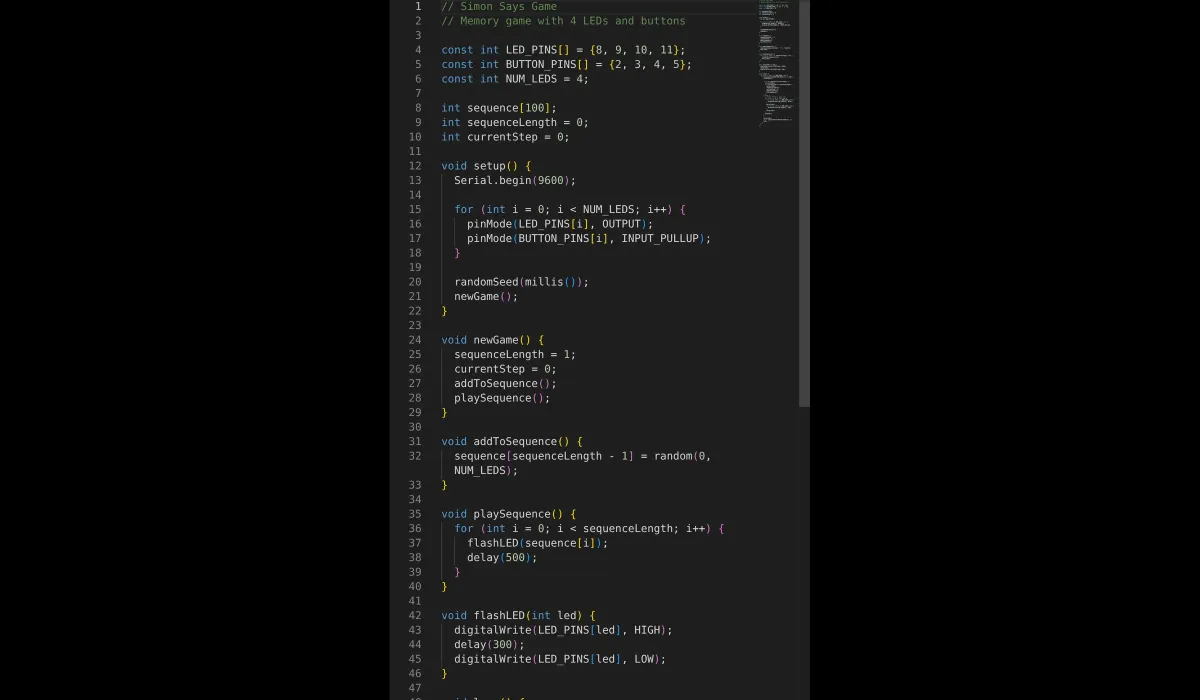
The sketch
// Simon Says memory game
// 4 LEDs on pins 8-11, 4 buttons on pins 2-5

const int LED_PINS[] = {8, 9, 10, 11};
const int BUTTON_PINS[] = {2, 3, 4, 5};
const int NUM_LEDS = 4;

int sequence[100];      // the pattern, up to 100 steps
int sequenceLength = 0; // how many steps this round
int currentStep = 0;    // player's progress this round

void setup() {
  Serial.begin(9600);
  for (int i = 0; i < NUM_LEDS; i++) {
    pinMode(LED_PINS[i], OUTPUT);
    pinMode(BUTTON_PINS[i], INPUT_PULLUP);
  }
  randomSeed(millis());
  newGame();
}

void newGame() {
  sequenceLength = 1;
  currentStep = 0;
  addToSequence();
  playSequence();
}

void addToSequence() {
  sequence[sequenceLength - 1] = random(0, NUM_LEDS);
}

void playSequence() {
  for (int i = 0; i < sequenceLength; i++) {
    flashLED(sequence[i]);
    delay(500);
  }
}

void flashLED(int led) {
  digitalWrite(LED_PINS[led], HIGH);
  delay(300);
  digitalWrite(LED_PINS[led], LOW);
}

void loop() {
  for (int i = 0; i < NUM_LEDS; i++) {
    if (digitalRead(BUTTON_PINS[i]) == LOW) {
      flashLED(i);

      if (i == sequence[currentStep]) {
        // right button
        currentStep++;
        if (currentStep == sequenceLength) {
          // round complete: add a step, play it back
          delay(1000);
          sequenceLength++;
          currentStep = 0;
          addToSequence();
          playSequence();
        }
      } else {
        // wrong button: flash everything 3x, start over
        for (int j = 0; j < 3; j++) {
          for (int k = 0; k < NUM_LEDS; k++) digitalWrite(LED_PINS[k], HIGH);
          delay(200);
          for (int k = 0; k < NUM_LEDS; k++) digitalWrite(LED_PINS[k], LOW);
          delay(200);
        }
        newGame();
      }

      delay(300);
      while (digitalRead(BUTTON_PINS[i]) == LOW); // wait for release
    }
  }
}
How the game actually flows
The code is a small state machine wearing a trench coat. Three variables carry the whole game:
sequence[]— the pattern so far. Each entry is an index 0–3 into the pin arrays, so “red” is just the number 0.sequenceLength— this round’s length. Starts at 1, grows by one every time you survive a round.currentStep— where your finger is in the pattern right now.
A round looks like this: playSequence() walks the array and flashes each LED (300ms on, 500ms apart). Then loop() goes back to polling the four buttons. Every press flashes its LED as feedback, then gets judged: match sequence[currentStep] and you advance; finish the whole thing and the game appends a random step and replays. Miss once and all four LEDs blink three times — the game’s way of laughing at you — and newGame() resets you to a one-step pattern.
The arrays doing double duty is the elegant part. LED_PINS[i] and BUTTON_PINS[i] are the same color because you wired them that way. One index drives output, input, and the sequence itself.
Honest notes on this sketch
This code is a fine teaching demo and a mediocre shipping product. A few rough edges worth knowing about before you build on it:
- Buttons are dead during playback.
playSequence()is one long chain ofdelay()calls, and nothing polls the buttons while it runs. Mashing red during the light show does nothing. For this game that’s arguably correct (it stops cheating), but don’t copy the pattern into anything that needs to stay responsive. - The debounce is a brick wall.
delay(300)pluswhile (digitalRead(...) == LOW)means “ignore everything until the finger leaves, plus a third of a second.” Crude, effective, and the reason the game never double-counts a press. Real buttons bounce; this sketch just refuses to listen during the bounce. randomSeed(millis())is weaker than it looks. On the simulator it works fine. On a real board, if you power up and the game starts at a predictable time,millis()can be nearly identical every boot — and so can your “random” sequence. The classic fix israndomSeed(analogRead(A0))with nothing connected to A0: floating-pin noise as entropy.sequence[100]is a hard cap. Reach step 101 and the code writes past the end of the array into whatever memory lives next door. Nobody in human history has memorized a 100-step Simon sequence, so it’s a theoretical bug — but it’s a real buffer overflow, and it’s worth recognizing the shape of one.
When it doesn’t work
- A button does nothing → check which leg pair you wired. These pushbuttons have internally-connected legs; pick the wrong pair and the pin is either never grounded or always grounded. In the sim, drag the wire to the other leg and retry.
- The game thinks you pressed when you didn’t → missing
INPUT_PULLUP(floating pin) or the button’s ground leg isn’t at GND. - An LED never lights → polarity or pin number. Long leg to the pin, and the pin number in
LED_PINS[]must match the wire. - “It ignored my button during the light show” → not a bug, see above. Wait for playback to finish.
- Debugging the sequence itself → the sketch already opens Serial. Sprinkle
Serial.println(sequence[i])into playback and the monitor will show you the pattern as numbers. Cheat freely; you’re the developer.
Make it a real game
The extension that changes everything: a piezo buzzer, one tone per color. The original toy was as much audio as visual, and tone(pin, 262 + led * 100)-style pitches make the patterns far easier to remember. After that, speed up playback as the sequence grows (shrink the 500 and 300 toward 200), and keep a high score in a variable you print over serial. All of it works in the simulator — the buzzer’s in the component picker next to the buttons.
Open the simulator and load the Simon Says example — all eight components are already wired and the game starts the moment you press Run. See how far you get. My own ceiling before writing this was seven steps, which says more about me than about the game.