
Blog
Arduino RTC Clock: Read a DS1307 over I2C, No Library Needed

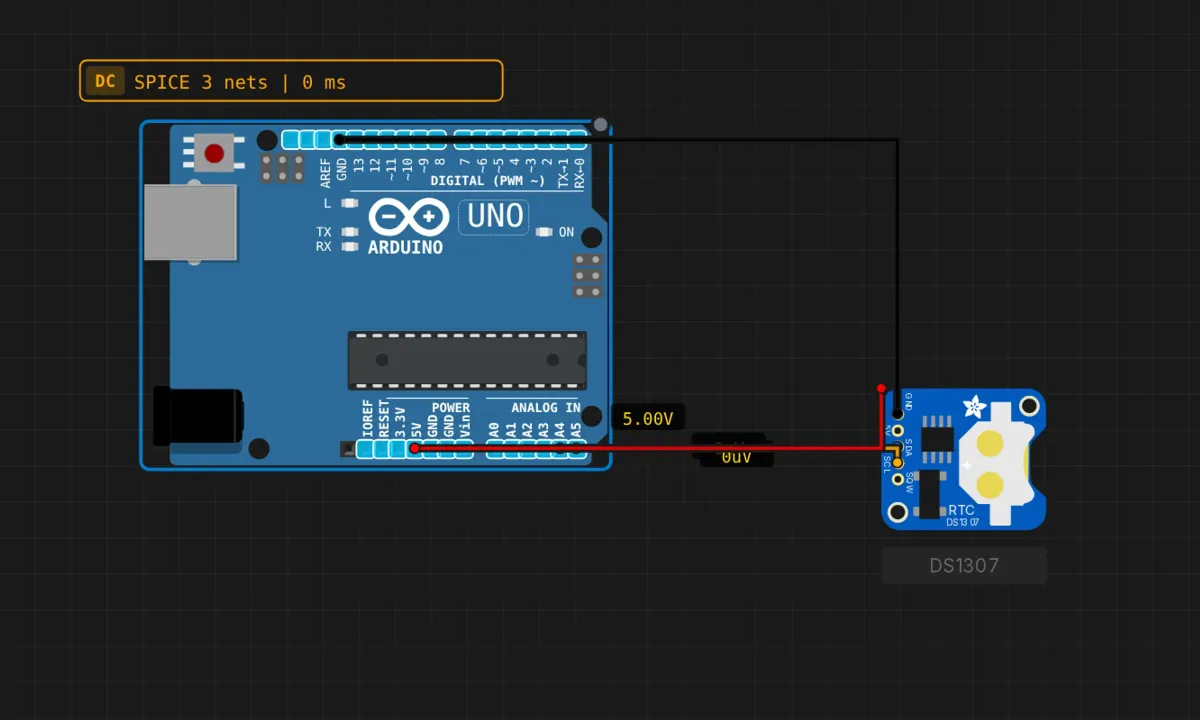
millis() has amnesia. Unplug the board and it forgets what time it was, because it never knew — it only counts from zero at boot. A real-time clock fixes that: a tiny chip with its own crystal and a coin cell, counting seconds whether your Arduino is powered or not. The DS1307 is the classic one — five cents’ worth of silicon that every starter kit ships with, on the I2C bus at address 0x68.
This project reads the time and date off a virtual DS1307 module and prints it to the serial monitor every second. No libraries beyond the built-in Wire — you’re talking to the chip’s registers directly, which is exactly why it’s worth doing once by hand.
Wiring: the usual I2C four
The DS1307 module sits on the same bus as everything else I2C: SDA to A4, SCL to A5, plus 5V and GND. If you just did the bus scanner project, it’s identical wiring — and the scanner would find this module at 0x68.
In the simulator the RTC module is already ticking; on a real module, the coin cell on the back is what keeps time while the Uno is off. (A detail the sim reasonably skips.)
The sketch
// DS1307 RTC reader
// Prints time + date to serial once per second

#include <Wire.h>

#define DS1307_ADDR 0x68

// the chip speaks BCD: each nibble is one decimal digit
byte bcdToDec(byte val) {
  return ((val >> 4) * 10) + (val & 0x0F);
}

void setup() {
  Wire.begin();
  Serial.begin(9600);

  Serial.println("===========================");
  Serial.println("  DS1307 RTC Reader (I2C)");
  Serial.println("===========================");
  Serial.println();
}

void loop() {
  // point the chip's register cursor at 0x00 (seconds)
  Wire.beginTransmission(DS1307_ADDR);
  Wire.write(0x00);
  Wire.endTransmission();

  // read 7 bytes: sec, min, hr, day-of-week, date, month, year
  Wire.requestFrom(DS1307_ADDR, 7);

  if (Wire.available() >= 7) {
    byte sec   = bcdToDec(Wire.read() & 0x7F);  // top bit = clock halt flag
    byte min   = bcdToDec(Wire.read());
    byte hr    = bcdToDec(Wire.read() & 0x3F);  // top bits = 12/24h mode
    byte dow   = bcdToDec(Wire.read());
    byte date  = bcdToDec(Wire.read());
    byte month = bcdToDec(Wire.read());
    byte year  = bcdToDec(Wire.read());

    Serial.print("Time: ");
    if (hr < 10) Serial.print("0");
    Serial.print(hr);
    Serial.print(":");
    if (min < 10) Serial.print("0");
    Serial.print(min);
    Serial.print(":");
    if (sec < 10) Serial.print("0");
    Serial.print(sec);

    Serial.print("  Date: ");
    if (date < 10) Serial.print("0");
    Serial.print(date);
    Serial.print("/");
    if (month < 10) Serial.print("0");
    Serial.print(month);
    Serial.print("/20");           // chip stores 2-digit year
    if (year < 10) Serial.print("0");
    Serial.println(year);
  } else {
    Serial.println("Error: Could not read RTC");
  }

  delay(1000);
}
How the register dance works
I2C chips are little filing cabinets. You don’t ask the DS1307 “what time is it” — you say “I’m going to look at register zero,” then you read seven bytes in a row and the chip hands you seconds through year in order. The first beginTransmission/write(0x00)/endTransmission() trio sets that internal pointer; requestFrom(addr, 7) does the actual reading. Every register-based I2C device on earth works this way, so the pattern transfers directly to sensors, EEPROMs, and port expanders.
Then there’s BCD — binary-coded decimal, a format older than most of the people reading this page. Instead of storing 59 as the byte 59, the chip stores it as 0x59: the high nibble is the tens digit, the low nibble the units. bcdToDec() unpacks that. Why? Because in 1980 it made display drivers simpler, and RTC chips never got the memo that we have division now.
The two masks are load-bearing. Bit 7 of the seconds register is the CH (clock halt) flag — if it’s set, the oscillator is stopped and you’re reading a frozen chip. And the hours register uses its top bits for 12/24-hour mode. Skip the masks and you’ll print times like 25:93, which is a rite of passage but only the first time.
Honest notes before you trust it with your schedule
- The DS1307 drifts. There’s no temperature compensation — the cheap crystal on the module wanders with room temperature, and a couple of minutes per month is normal. For a clock that stays honest, the DS3231 is the drop-in upgrade everyone ends up buying; same bus, same concept, better crystal. Learn on the 1307, ship the 3231.
- The year is two digits. The chip has no century register — notice the hardcoded
"/20"in the print. It’ll roll from 99 to 00 without blinking. Your problem, not the chip’s. - A fresh real chip may be halted. Brand-new DS1307s often ship with the CH bit set — oscillator off, time frozen at whatever the factory left. Reading works fine; the numbers just never change. You clear it by writing to the chip, which is the natural extension below.
- In the sim, time starts when the sim starts. Convenient for testing; remember that the entire point of the real chip is the coin cell outliving your power supply.
When the numbers are wrong
- “Error: Could not read RTC” → the bus didn’t answer. Address is 0x68 (7-bit); wiring is SDA→A4, SCL→A5; and on real hardware, pull-ups somewhere on the line.
- Impossible times (25:85, 32/45/2065) → you skipped
bcdToDec()or the bit masks. The chip isn’t broken; it’s speaking BCD and you’re reading it as binary. - Time reads fine but never advances (real hardware) → clock halt bit. Write a zero to the seconds register’s top bit — i.e., set the time once.
- Nothing on serial at all → sim not running / monitor not open, as usual.
Where to go from here
The missing half of this project is setting the time: same register-pointer dance in reverse — beginTransmission, write(0x00), then seven BCD-encoded bytes, endTransmission(). Pair it with serial input and you can type the time once and let the coin cell take over. After that: put the time on the LCD or OLED from the earlier projects, and you have a desk clock. Or log sensor readings with real timestamps — which is when an RTC stops being a toy and starts being infrastructure.
Open the simulator and load the RTC example — the chip is already ticking on the bus. Try removing the two masks from the hour and second lines and watch what the raw registers actually look like. BCD is less mysterious after you’ve read 25:93 with your own eyes.